Friday, 2 April 2021
Liquibase Demostration with Spring Boot Application
The following demonstration is a Spring Boot application which only exposes a GET endpoint /users/:id. To integrate Liquibase, add a dependency for it in pom.xml.
```
<dependency>
<groupId>org.liquibase</groupId>
<artifactId>liquibase-core</artifactId>
</dependency>
```
The changelog files are located in resources/db/changelog/.
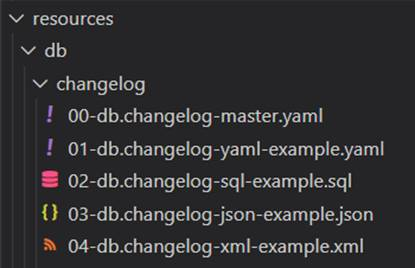
Liquibase supports SQL, XML, JSON and YAML format for storing changelog files. The 00-db.changelog-master.yaml includes the changelog files for the releases in the correct order.
00-db.changelog-master.yaml
```yml
databaseChangeLog:
- include:
file: 01-db.changelog-yaml-example.yaml
relativeToChangelogFile: true
- include:
file: 02-db.changelog-sql-example.sql
relativeToChangelogFile: true
- include:
file: 03-db.changelog-json-example.json
relativeToChangelogFile: true
- include:
file: 04-db.changelog-xml-example.xml
relativeToChangelogFile: true
```
01-db.changelog-yaml-example.yaml
Here's an example of changelog in YAML format. It creates a table called user_details with four fields – id, username, first_name, last_name. A ChangeSet is identified by id and author. For best practice, keep only one change per ChangeSet. Pre-conditions can also be added here.
```yml
databaseChangeLog:
- changeSet:
id: create-table-user
author: liquibase-demo-service
preConditions:
- onFail: MARK_RAN
not:
tableExists:
tableName: user_details
changes:
- createTable:
columns:
- column:
autoIncrement: true
constraints:
nullable: false
primaryKey: true
primaryKeyName: user_pkey
name: id
type: BIGINT
- column:
constraints:
nullable: false
name: username
type: TEXT
- column:
constraints:
nullable: false
name: first_name
type: TEXT
- column:
name: last_name
type: TEXT
tableName: user_details
```
02-db.changelog-sql-example.sql
Here's an example of changelog in SQL format. It must start with the line –liquibase formatted sql to provide liquibase with metadata, followed by arbitrary SQL statements with a comment of the form :
``--changeset author:id attribute1:value1 attribute2:value2 [...]``.
```sql
--liquibase formatted sql
--changeset liquibase-demo-service:add-user-name-constraint
ALTER TABLE user_details ADD CONSTRAINT user_details_username_key UNIQUE (username);
```
03-db.changelog-json-example.json
Here's an example of changelog in JSON format.
```json
{ "databaseChangeLog": [
{
"changeSet": {
"id": "add-last-name-constraint",
"author": "liquibase-demo-service",
"changes": [
{
"addNotNullConstraint": {
"columnName": "last_name",
"constraintName": "user_last_name_key",
"tableName": "user_details"
}
}]
}
}
]
}
```
04-db.changelog-xml-example.xml
Here's an example of changelog in XML format. It utilizes loadUpdateData to loads and update from a CSV file into an existing table.
```
<?xml version="1.1" encoding="UTF-8" standalone="no"?>
<databaseChangeLog xmlns="http://www.liquibase.org/xml/ns/dbchangelog"
xmlns:xsi="http://www.w3.org/2001/XMLSchema-instance"
xsi:schemaLocation="http://www.liquibase.org/xml/ns/dbchangelog http://www.liquibase.org/xml/ns/dbchangelog/dbchangelog-3.8.xsd">
<changeSet author="liquibase-docs" id="loadUpdateData-example" context="!prod">
<loadUpdateData
encoding="UTF-8"
relativeToChangelogFile="true"
file="../data/users.csv"
onlyUpdate="false"
primaryKey="id"
quotchar="'"
separator=","
tableName="user_details">
</loadUpdateData>
</changeSet>
</databaseChangeLog>
```
By default, Liquibase is enabled. Those changelog files will be executed at Spring Boot startup. To disable it, add the following property in src\main\resources\application.yaml.
```
spring:
liquibase:
enabled: false
```
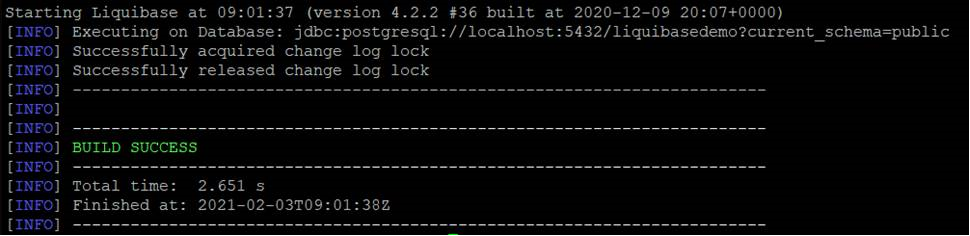
To deploy any changes in the changelog files that have not been deployed to database yet, run the update goal.
```
./mvnw org.liquibase:liquibase-maven-plugin:update \
-Dliquibase.url=jdbc:postgresql://localhost:5432/liquibasedemo?current_schema=public \
-Dliquibase.changeLogFile=src/main/resources/db/changelog/00-db.changelog-master.yaml \
-Dliquibase.username=demouser \
-Dliquibase.password=demopassword
```
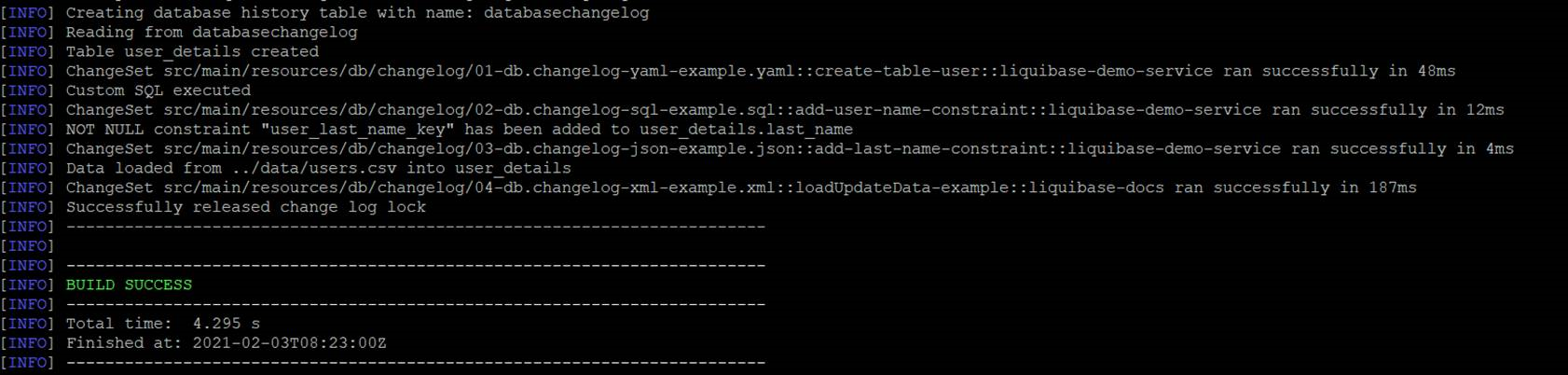
After running update goal, four tables have been created.
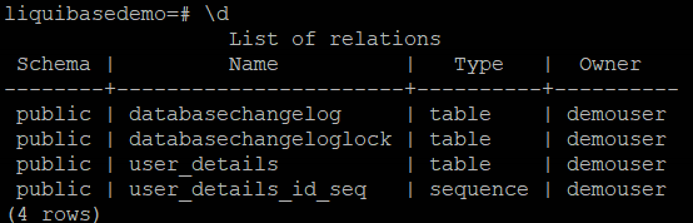
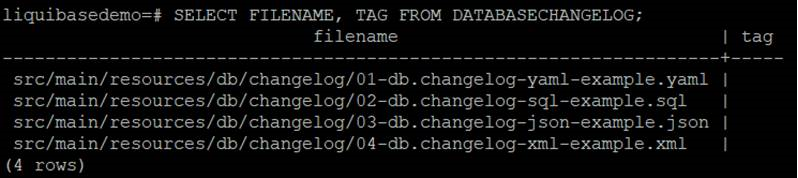
databasechangelog tracks which changeset have been run.
databasechangeloglock ensures there is only one Liquibase is running at one time as multiple instances being executed against the same database concurrently will lead to conflicts.
The table user_details is defined in 01-db.changelog-yaml-example.yaml, with constraints defined in 02-db.changelog-sql-example.sql and 03-db.changelog-json-example.json. The data is loaded in 04-db.changelog-xml-example.xml.
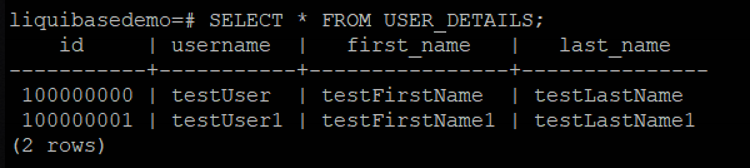
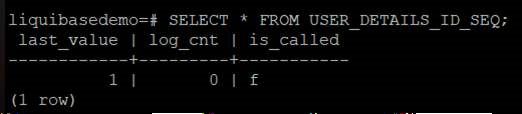
user_details_id_seq is a sequence table for user_details.
To verify the result, start the Sprint Boot Application.

Get user with id 100000000

Tag can be used to mark the current database state for rollback in the future.
To create a tag, run the following goal
```
./mvnw org.liquibase:liquibase-maven-plugin:tag \
-Dliquibase.tag=version1 \
-Dliquibase.url=jdbc:postgresql://localhost:5432/liquibasedemo?current_schema=public \
-Dliquibase.username=demouser \
-Dliquibase.password=demopassword
```
A tag version has been added.
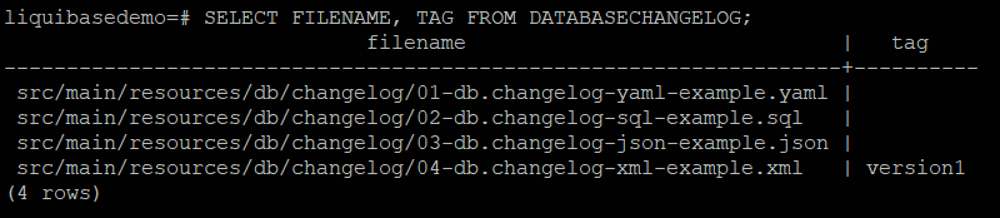
There are three rollback modes – rollbackByTag, rollbackToDate and rollbackCount.
· RollbackByTag reverts all changes made to the database after the specific tag.
· RollbackToDate reverts all changes made to the database from the current date to the date and time you specify.
· RollbackCount reverts the changes sequentially starting with the most recent changes.
There are another modes such as rollbackOneChangeSet and rollbackOneUpdate but it requires Liquibase Pro.
Take the first one as an example, supposing there is another changelog – adding middle_name in user_details.
05-add-middle-name.json
Here we add the rollback statement to this changeset.
```
{ "databaseChangeLog": [
{
"changeSet": {
"id": "add-middle-name",
"author": "liquibase-demo-service",
"changes":[{
"addColumn":{
"catalogName":"cat",
"columns":[{
"column":{
"name":"middle_name",
"type":"TEXT"
}
}
],
"schemaName":"public",
"tableName":"user_details"
}
}
],
"rollback": [
{
"sql": {
"sql": "ALTER TABLE USER_DETAILS DROP COLUMN middle_name;"
}
}
]
}
}
]}
```
Deploy this changelog
```
./mvnw org.liquibase:liquibase-maven-plugin:update \
-Dliquibase.url=jdbc:postgresql://localhost:5432/liquibasedemo?current_schema=public \
-Dliquibase.changeLogFile=src/main/resources/db/changelog/05-add-middle-name.json \
-Dliquibase.username=demouser \
-Dliquibase.password=demopassword
```
The column "middle_name" has been added.

The latest changelog is after the tag version1.
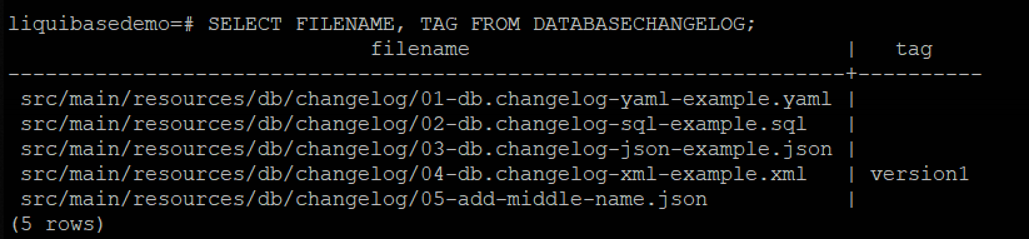
If we need to revert the changes after it, update 00-db.changelog-master.yaml to include the latest changelog.
```
- include:
file: 05-add-middle-name.json
relativeToChangelogFile: true
```
then run the following goal.
```
./mvnw org.liquibase:liquibase-maven-plugin:tag \
-Dliquibase.tag=version1 \
-Dliquibase.url=jdbc:postgresql://localhost:5432/liquibasedemo?current_schema=public \
-Dliquibase.username=demouser \
-Dliquibase.password=demopassword
```

The record for 05-add-middle-name.json has been dropped.
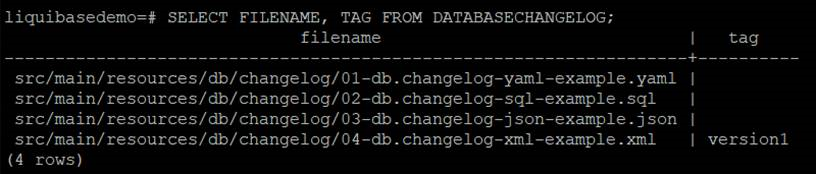
The column middle_name has been dropped.
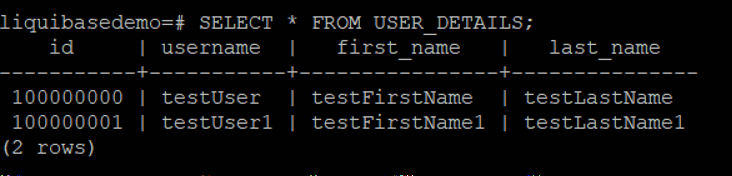
Similarly, we can use RollbackToDate or RollbackCount to revert the changes.
RollbackToDate
liquibase:rollback -Dliquibase.rollbackCount=1
RollbackCount
liquibase:rollback "-Dliquibase.rollbackDate=Feb 03, 2021"
To conclude, we can define changelogs in 4 possible formats and run the Maven Goals to deploy them to database in the pipeline. We can also create a tag to mark the current state and rollback if necessary.

How to solve RESOURCE:ENI error when creating an ECS task on EC2 server instance?
Supposing there are two ECS services with ``awsvpc`` networking on a ``m5.large`` EC2 instance, each service has two target tasks, and now you are adding a new service with the same settings. It is expected to see the below error under Tasks tab.
service was unable to place a task because no container instance met all of its requirements. The closest matching container-instance XXXXXXXXXXXXXXXXXXXXXXXXXXXXXXXX encountered error "RESOURCE:ENI". For more information, see the Troubleshooting section.
For ``RESOURCE:ENI`` errors, it means that there are not enough elastic network interface (ENI) attachment points in your cluster. By running the below command, you can see that the maximum network interface for each m5 types.
aws ec2 describe-instance-types --filters Name=instance-type,Values=m5.* --query "InstanceTypes[].{Type: InstanceType, MaxENI: NetworkInfo.MaximumNetworkInterfaces, IPv4addr: NetworkInfo.Ipv4AddressesPerInterface}"
For ``m5.large``, the ``maxENI`` is ``3``. From [the official documentation](https://docs.aws.amazon.com/AmazonECS/latest/developerguide/task-networking.html), it states that
Each Amazon ECS task that uses the awsvpc network mode receives its own elastic network interface (ENI), which is attached to the Amazon EC2 instance that hosts it. There is a default limit to the number of network interfaces that can be attached to an Amazon EC2 instance, and the primary network interface counts as one. For example, by default a c5.large instance may have up to three ENIs attached to it. The primary network interface for the instance counts as one, so you can attach an additional two ENIs to the instance. Because each task using the awsvpc network mode requires an ENI, you can typically only run two such tasks on this instance type. For more information on the default ENI limits for each instance type, see IP addresses per network interface per instance type in the Amazon EC2 User Guide for Linux Instances.
Hence, let's do the math.
Since there are two EC2 instances, the maxENI is 3 * 2 = 6 for this ECS cluster. We need 1 primary network interface for each instance, which means now we only have 4 available ENI to use. A service has two target tasks, each task takes 1 ENI. Therefore, two services take 4. Hence, before adding a new service, the available ENI is actually ``6 - 1 - 1 - 2 - 2 = 0``. Therefore, when we try to add a new service, even with one target task, it will still fail as there is no available ENI.
Therer are several solutions.
- You can choose a different instance type. For the number, you can run ``describe-instance-types`` to check it.
- You can change the task count to free some ENI.
- You can raise the limit by using Elastic network interface trunking.
Sunday, 7 March 2021
E-Olymp Competition - Dynamic programming (Linear) - Unofficial Editorial
Contest Link:
[https://www.e-olymp.com/en/contests/19775](https://www.e-olymp.com/en/contests/19775)
Full Solution:
[https://github.com/wingkwong/competitive-programming/tree/master/e-olymp/contests/19775-dynamic-programming-linear](https://github.com/wingkwong/competitive-programming/tree/master/e-olymp/contests/19775-dynamic-programming-linear)
# [A - Decreasing Number](https://www.e-olymp.com/en/contests/19775/problems/213338)
## Problem Statement
There are three types of operations you can perform on an integer:
1. If it's divisible by 3, divide it by 3.
2. If it's divisible by 2, divide it by 2.
3. Subtract 1.
Given a positive integer n, find the minimal number of operations needed to produce the number 1.
## Analysis
Let $ \texttt{dp[n]} $ be the smallest number of operations to convert the number $ n $ to $ 1 $. For the base case, we know that for $ n = 1 $, there is no operation. Hence, we can define $ dp[1] = 0 $. For $ n = 2 $, there is only one way to do it which is the third operation. For $ n = 5 $, we can convert it like $ 5 \to 4 \to 2 \to 1 $, therefore we got $ dp[5] = 3 $.
Therefore, the transition functions $ dp[i] $ for $ i = 2 \ldots n $ would be
$$\begin{equation}\begin{aligned}
dp[i] = dp[\frac{i}{3}] + 1 \\\\
dp[i] = dp[\frac{i}{2}] + 1 \\\\
dp[i] = dp[i - 1] + 1
\end{aligned}\end{equation}$$
We can only apply the first two operations only when the number can be divisible by $ 3 $ and $ 2 $ respectively. For every number greater than 1, we can subtract 1. Therefore, we can take the minimum one from previous results and add 1 to form $ dp[i] $.
## Implementation
```cpp
int dp[1000005];
int go(int n) {
dp[1] = 0;
FORN(i, 2, n) {
dp[i] = dp[i - 1] + 1;
if(i % 2 == 0) dp[i] = min(dp[i], dp[i / 2] + 1);
if(i % 3 == 0) dp[i] = min(dp[i], dp[i / 3] + 1);
}
return dp[n];
}
void solve() {
int x;
while(cin >> x) {
OUT(go(x));
}
}
```
# [B - House Robber](https://www.e-olymp.com/en/contests/19775/problems/213339)
## Problem Statement
You are a professional robber planning to rob houses along a street. Each house has a certain amount of money stashed, the only constraint stopping you from robbing each of them is that adjacent houses have security system connected and it will automatically contact the police if two adjacent houses are broken into on the same night.
Given a list of non-negative integers representing the amount of money of each house, determine the maximum amount of money you can rob tonight without alerting the police.
## Analysis
Let $ dp[i] $ be the maximum amount of money you can rob up to house $ i $ (0-base). We can think about the base cases first. We can set $ dp[0] = a[0] $ as we can only rob this house and $ dp[1] = max(a[0], a[1]) $ as we can only rob either one. Since we cannot rob adjacent houses, that means we can rob the current house $ i $ only if the house $ i - 1 $ hasn't been robbed. If we rob the current house, the total amount would be $ dp[i - 2] + a_i $. If not, that would be $ dp[i - 1] + 0 $. We just need to take the maximum one.
## Implementation
Notice that the sum can be large so we cannot use int.
```cpp
ll dp[1000005];
void solve() {
int n; cin >> n;
vl a(n);
READ(a);
dp[0] = a[0];
dp[1] = max(a[0], a[1]);
FOR(i, 2, n) dp[i] = max(dp[i - 1], dp[i - 2] + a[i]);
OUT(dp[n - 1]);
}
```
# [C - Dice Combinations](https://www.e-olymp.com/en/contests/19775/problems/213340)
## Problem Statement
Your task is to count the number of ways to construct sum $ n $ by throwing a dice one or more times. Each throw produces an outcome between $ 1 $ and $ 6 $.
## Analysis
This question is like a knapsack problem. We can see that as we have infinite numbers of items with weights from $ 1 $ to $ 6 $ and we need to find out how many possible ways to make the knapsack completely full. Let $dp[i]$ be the number of ways to make it to sum $ i $ using numbers from $ 1 $ to $ 6 $. There is only one way to make the sum zero. Hence, we got $ dp[0] = 1 $. Let's say if last item was a $ 1 $, then we know there are $ dp[i - 1] $ ways to make the sum to $i$. If the last item was a $ 2 $, that would be $dp[i - 2]$ ways. The same logic applies for all the number from $ 1 $ to $ 6 $. Therefore we know that
$$
dp[i] = \sum\limits_{j = 1}^{6} {dp[i - j]}
$$
## Implementation
```
int dp[1000005];
void solve() {
int n; cin >> n;
dp[0] = 1;
FORN(i, 1, n) {
FORN(j, 1, 6) {
if(i - j >= 0) {
(dp[i] += dp[i - j]) %= 1000000007;
}
}
}
OUT(dp[n]);
}
```
# [D - Nails](https://www.e-olymp.com/en/contests/19775/problems/213341)
## Problem Statement
Some nails are hammered on a straight plank. Any two nails can be joined by a thread. Connect some pairs of nails with a thread, so that to each nail will be tied with at least one thread, and the total length of all threads will be minimal.
## Analysis
We can sort the coordinates of all the nails first. Let $ dp[i] $ be the minimum total length of all threads from the first nail to the i-th one. For the base cases we have $ dp[0] = 0 $, $ dp[1] = a[1] - a[0] $ and $ dp[2] = a[2] - a[1] $.
Starting from $ i = 3 $, we can either connect the first $ i - 2 $ nails to have $ dp[i - 2] + a[i] - a[i - 1]$ or the first $ i - 1 $ nails to have $ dp[i - 1] + a[i] - a[i - 1] $. Therefore, we have to take the minimum length for each $ i $ where $3 \leqslant i \leqslant n $ holds to have
$$
dp[i] = min(dp[i - 1], dp[i - 2]) + a[i] - a[i - 1]
$$
## Implementation
```
int dp[1000005];
void solve() {
int n; cin >> n;
vi a(n);
READ(a);
SORT(a);
dp[1] = a[1] - a[0], dp[2] = a[2] - a[0];
FOR(i, 3, n) dp[i] = min(dp[i - 1], dp[i - 2]) + a[i] - a[i - 1];
OUT(dp[n - 1]);
}
```
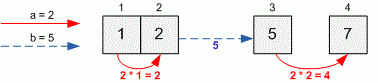
# [E - Journey from west to east](https://www.e-olymp.com/en/contests/19775/problems/213342)
## Problem Statement
There are n cities standing on a straight line from west to east. The cities are numbered from 1 to n, in order from west to east. Each point on the line has its own one-dimensional coordinate, and the point closer to the east has a large coordinate. The coordinate of the i-th city is xi.
You are now in city 1, and want to visit all cities. You have two ways to travel:
Walk in a straight line. At the same time, your level of fatigue will increase by a units each time you move a distance of 1, regardless of the direction.
Teleport to any point you want. Your fatigue level will increase by b units, regardless of teleported distance.
## Analysis
Let $ dp[i] $ be the lowest possible level of fatigue accumulated from the first city to the $i-th$ city.
We can walk in a straight line to make our level of fatigue increase by $ a * (x[i] - x[i - 1]) $ or teleport to a point to make that increase by b. Therefore, the transition is a bit obvious.
$$
dp[i] = dp[i - 1] + min(a * (x[i] - x[i - 1], b)
$$
## Implementation
```
ll dp[1000005];
void solve() {
ll n, a, b; cin >> n >> a >> b;
vl x(n);
READ(x);
dp[0] = dp[1] = 0;
FORN(i, 2, n) {
dp[i] = dp[i - 1] + min(a * (x[i - 1] - x[i - 2]), b);
}
OUT(dp[n]);
}
```
# [F - Grasshopper](https://www.e-olymp.com/en/contests/19775/problems/213343)
## Problem Statement
Grasshopper lives in the teacher's room. It likes to jump on one dimensional checkerboard. The length of the board is n cells. To its regret, it can jump only on 1, 2, ..., k cells forward.
Once teachers wondered in how many ways a grasshopper can reach the last cell from the first one. Help them to answer this question.
## Analysis
Let $ dp[i] $ be the number of ways for grasshopper to leap from the first cell to the $i-th$ cell. We know that there is only one way to move for $ i = 1 $ and $ i = 2 $. For $ 3 \leqslant i \leqslant k $, we can reach $i$-th cell from the previous cells. Therefore we can have
$$
dp[i] = dp[1] + dp[2] + \ldots + dp[i - 1]
= \sum\limits_{j = 1}^{i - 1} {dp[j]}
$$
This would work if k is small enough. For large $ k $, we need a better way to calculate $ dp[i] $. Based on the observation, the first five values are $1, 1, 2, 4, 8$. Starting from $ i = 2 $, $ dp[i] $ is doubled from the previous value $ dp[i - 1] $. Formally, it can be obtained as follows.
$
\begin{equation}
dp[i] = dp[1] + dp[2] + \ldots + dp[i - 2] + dp[i - 1]
\end{equation}\tag{1}
$
$
\begin{equation}
dp[i - 1] = dp[1] + dp[2] + \ldots + dp[i - 2]
\end{equation}\tag{2}
$
Put $ (2) $ into $ (1) $
$$
dp[i] = dp[i - 1] + dp[i - 1]
$$
For $ 3 \leqslant i \leqslant k $, now we know that $ dp[i] = 2 * dp[i - 1] $. For $ i \gt k $, it can be reached from previous cells starting from $ i - k $.
$$
dp[i] = dp[i - k] + \ldots + dp[i - 1]
= \sum\limits_{j = i - k}^{i - 1} {dp[j]}
$$
Similarly, we can rewrite it as follows.
$
\begin{equation}
dp[i] = dp[i - k] + \ldots + dp[i - 2] + dp[i - 1]
\end{equation}\tag{3}
$
$
\begin{equation}
dp[i - 1] = dp[i - k - 1] + dp[i - k] + \ldots + dp[i - 2]
\end{equation}\tag{4}
$
Put $ (3) $ into $ (4) $
$$
dp[i] = (dp[i - k - 1] + dp[i - k] + \ldots + dp[i - 2]) + dp[i - 1] - dp[i - k - 1]
$$
$$
dp[i] = dp[i - 1] + dp[i - 1] - dp[i - k - 1]
$$
Therefore, we can conclude that we have $ dp[i] = 2 * dp[i - 1] $ for $ 3 \leqslant i \leqslant k $ and $ dp[i] = 2 * dp[i - 1] - dp[i - 1 - k] $ for $ i \gt k $.
## Implementation
```
int dp[1000005];
void solve() {
int n, k; cin >> n >> k;
dp[1] = dp[2] = 1;
FORN(i, 3, n) {
dp[i] = 2 * dp[i - 1];
if(i > k) dp[i] -= dp[i - 1 - k];
}
OUT(dp[n]);
}
```
# [G - Platforms](https://www.e-olymp.com/en/contests/19775/problems/213344)
## Problem Statement
In older games one can run into the next situation. The hero jumps along the platforms that hang in the air. He must move himself from one side of the screen to the other. When the hero jumps from one platform to the neighboring, he spends |y_2 - y_1| energy, where y1 and y2 are the heights where these platforms hang. The hero can make a super jump that allows him to skip one platform, but it takes him 3 * |y3 - y1| energy.
You are given the heights of the platforms in order from the left side to the right. Find the minimum amount of energy to get from the 1-st (start) platform to the n-th (last). Print the list (sequence) of the platforms that the hero must pass.
## Analysis
Let $ dp[i] $ be the minimum amount of energy to get from the 1-st platform to the $i$-th. Starting from the base cases, we know that we need zero energy to reach the first platform, i.e. $ dp[1] = 0 $ and we need $ |y2 - y1| $ energy for $ dp[2] $. Starting from the third platform, we can either reach from the previous platform $ p[i - 1] $ or use super jump from $ p[i - 1] $. Hence, the minimum energy for $ dp[i] $ would be
$$
dp[i] = min(dp[i - 1] + |y_{i} - y_{i-1}|, dp[i - 2] + 3 * |y_{i} - y_{i - 2}|)
$$
So now we solve the first subtask. The remaining subtasks are to find out the number of platforms to pass and the list of these platforms. We can use another vector to store the index for each choice so that we can perform a path restoring at the end. The size of this vector is the answer to the second subtask and we need to reverse the vector to build the answer to the third subtask.
## Implementation
```
int dp[1000005];
void solve() {
int n; cin >> n;
vi a(n + 1);
REPN(i, n) cin >> a[i];
dp[1] = 0;
dp[2] = abs(a[2] - a[1]);
vi p = {0, -1, 1}, ans;
FORN(i, 3, n) {
int x = dp[i - 1] + abs(a[i] - a[i - 1]);
int y = dp[i - 2] + 3 * abs(a[i] - a[i - 2]);
dp[i] = x < y ? x : y;
p.pb(x < y ? i - 1 : i - 2);
}
OUT(dp[n]);
int v = n;
while(v != -1) {
ans.pb(v);
v = p[v];
}
REVERSE(ans);
OUT(SIZE(ans));
EACH(x, ans) OUTH(x);
OUT("");
}
```
# [H - Frog](https://www.e-olymp.com/en/contests/19775/problems/213345)
## Problem Statement
There are n stones, numbered 1, 2, ..., n. For each i (1 ≤ i ≤ n), the height of stone i is hi. There is a frog who is initially on stone 1. It will repeat the following action some number of times to reach stone n: if the frog is currently on stone i, jump to stone i + 1 or stone i + 2. Here, a cost of |hi − hj| is incurred, where j is the stone to land on.
Find the minimum possible total cost incurred before the frog reaches stone n.
## Analysis
Let $ dp[i] $ be the minimum possible total cost for frog to reach stone $ i $. We can reach the first stone without any cost and there is only one way to jump to the second stone. Hence, we know the base cases are $dp[1] = 0$ and $dp[2] = |h_2 - h_1|$. Starting from the thrid stone, we can either jump it from the last $i - 1$ stone or $i - 2$ stone. Therefore, we can add the current cost to previous results and take the minimum one.
$$
dp[i] = min(dp[i - 1] + |h_i - h_{i - 1}|, dp[i - 2] + |h_i - h_{i - 2}|)
$$
## Implementation
```
int dp[1000005], h[1000005];
void solve() {
int n; cin >> n;
REPN(i, n) cin >> h[i];
dp[1] = 0;
dp[2] = abs(h[2] - h[1]);
FORN(i, 3, n) {
dp[i] = min(
dp[i - 1] + abs(h[i] - h[i - 1]),
dp[i - 2] + abs(h[i] - h[i - 2])
);
}
OUT(dp[n]);
}
```
# [I - Platforms - 3](https://www.e-olymp.com/en/contests/19775/problems/213346)
## Problem Statement
In older games one can run into the next situation. The hero jumps along the platforms that hang in the air. He must move himself from one side of the screen to the other. When the hero jumps from one platform to the neighboring, he spends |y2 - y1|^2 energy, where y1 and y2 are the heights where these platforms hang. The hero can make a super jump that allows him to skip one platform, but it takes him 3 * |y3 - y1|^2 energy. Symbol ^ here indicated exponentiation.
You are given the heights of the platforms in order from the left side to the right. Find the minimum amount of energy to get from the 1-st (start) platform to the n-th (last).
## Analysis
It is similar to the previous problem. Sometimes it is optimal to make a step back and jump to other platform. For exmaple, let's say there are four platforms and we can jump in the this order: $1 -> 3 -> 2 -> 4$.
Let $ dp[i] $ be the minimum amount of energy to get from the 1-st platform to the $i$-th. We know that we don't need any energy to reach the first platform so we have $dp[1] = 0$. For the second platform, there are two cases to consider:
1. If there are only two platforms, the only way to reach the second platform is from the first platform. Hence, the required energy is $|a_2 - a_1| ^ 2$.
2. We can first jump to the third platform and jump back to the second platform. The required energy is $3 * |a_1 - a_3| ^ 2 + |a_2 - a_3| ^ 2$
Similarily, for $3 \leqslant i \leqslant n$, we can either
1. jump from the $(i - 1)$-th platform
2. super jump from the $(i - 2)$-th platform
3. jump from $(i - 1)$-th platform to $(i + 1)$-th platform and jump back to $i$-th platform if the jump is valid ($i < n$)
The required energy for each case would be
$$
dp[i - 1] + |a_i - a_{i - 1}| ^ 2 \\
$$
$$
dp[i - 2] + 3 * |a_i - a_{i - 2}| ^ 2 \\
$$
$$
dp[i - 1] + 3 * |a_{i + 1} - a_{i - 1}| ^ 2 + |a_i - a_{i + 1}| ^ 2
$$
and $ dp[i] $ takes the minimum one.
## Implementation
```
ll dp[1000005], a[1000005];
ll exp2(ll x) {
return x * x;
}
void solve() {
int n; cin >> n;
REPN(i, n) cin >> a[i];
dp[1] = 0;
dp[2] = exp2(abs(a[2] - a[1]));
if(n == 2) {
OUT(dp[n]);
return;
}
dp[2] = min(
exp2(abs(a[1] - a[2])), // 1 -> 2
3 * exp2(abs(a[1] - a[3])) + exp2(abs(a[3] - a[2])) // 1 -> 3 -> 2
);
FORN(i, 3, n) {
dp[i] = min(
dp[i - 1] + exp2(abs(a[i - 1] - a[i])),
dp[i - 2] + 3 * exp2(abs(a[i - 2] - a[i]))
);
if(i < n) {
dp[i] = min(
dp[i],
dp[i - 1] + 3 * exp2(abs(a[i - 1] - a[i + 1])) + exp2(abs(a[i] - a[i + 1]))
);
}
}
OUT(dp[n]);
}
```
# [J - Buying tickets](https://www.e-olymp.com/en/contests/19775/problems/213347)
## Problem Statement
There is a queue of n people to buy tickets to a musical premiere. Each person wants to buy exactly one ticket. Only one ticket-office was working, therefore ticketing was very slowly, bringing "guests" to despair. The most smart people quickly noticed that, as a rule, the cashier sells several tickets in one hand faster than when those same tickets are sold one by one. So they proposed for a number of people standing in a row to give money to the first one of them, so that he would buy tickets for all.
However to deal with speculators, the cashier decided to sell maximum of three tickets per person, so to agree with each other in such way can only two or three successive persons.
It is known that to sell one ticket for the i-th person in the queue takes ai seconds, to sell two tickets takes bi seconds, to sell three tickets takes ci seconds. Write a program that calculates the minimum time to serve all the customers.
Please note that tickets for a group of united people always buys the first one. Also, no one buys extra tickets for speeding up the process (i.e. the tickets that are not wanted).
## Analysis
Let $dp[i]$ be the minimum time in seconds to serve from the first to $i$-th customer. We only need $a_1$ seconds to server the first one if there is only one customer. If there are two customers, it takes either $a_1 + a_2$ seconds or $b_1$ seconds. Therefore, we know that the base cases are
$$
dp[1] = a_1
$$
$$
dp[2] = min(a_1 + a_2, b_1)
$$
If there are three or more customers, we have three cases to consider:
1. If the $i$-th customer buys one ticket, it takes $dp[i - 1] + a_i$ seconds
2. If the $(i-1)$-th customer buy two tickets, it takes $dp[i - 2] + b_{i - 1}$ seconds
3. If the $(i-2)$-th customer buy two tickets, it takes $dp[i - 3] + b_{i - 2}$ seconds
We take the minimum value from these three cases.
$$
dp[i] = min(dp[i - 1] + a_i, dp[i - 2] + b_{i - 1}, dp[i - 3] + b_{i - 2})
$$
## Implementation
```
int dp[1000005], a[1000005], b[1000005], c[1000005], d[1000005];
void solve() {
int n; cin >> n;
REPN(i, n) cin >> a[i] >> b[i] >> c[i];
dp[0] = 0;
dp[1] = a[1];
dp[2] = min(a[1] + a[2], b[1]);
FORN(i, 3, n) dp[i] = min({
dp[i - 1] + a[i],
dp[i - 2] + b[i - 1],
dp[i - 3] + c[i - 2]
});
OUT(dp[n]);
}
```
Sunday, 28 February 2021
Chinese Remainder Theorem
A linear congruence can be displayed as
$$
ax \equiv b (\text{mod } m )
$$
By definition of congruence, $ ax \equiv b (\text{mod } m ) $ iff $ax - b$ is disible by $m$. According to Wikipedia, the earliest known statement of the Chinese Remainder Theorem is by the Chinese mathematician Sun-tzu in the Sun-tzu Suan-ching in the 3rd century AD.
$$
今有物不知其數,三三數之剩二,五五數之剩三,七七數之剩二,問物幾何?
$$
We can rewrite the above statement into below congruence equations.
$$
x \equiv 2 (\text{mod } 3 )
$$
$$
x \equiv 3 (\text{mod } 5 )
$$
$$
x \equiv 2 (\text{mod } 7 )
$$
and the answer is $23$. In fact, this is the minimum possible solution. Starting from 23, you can get another possible answer by adding 105, i.e.
$$
x = 23 + 105 * n
$$
where
$$
n \in {0, 1, 2, 3, \cdots}
$$
Given a set of congruence equations, we are interested to find $a$ that produces the given remainders.
$$
a \equiv a_1 (\text{mod } p_1 )
$$
$$
a \equiv a_2 (\text{mod } p_2 )
$$
$$
\cdots \\
$$
$$
a \equiv a_k (\text{mod } p_k )
$$
where every pair $p_i$ are pairwise coprime, $a_i$ are given constants.
## Problem: [Oversleeping](https://atcoder.jp/contests/abc193/tasks/abc193_e) In this problem, we are interested in finding the minimum non-negative integer t such that $$ X \le t \text{ mod } (2X + 2Y) \lt X + Y $$ $$ P \le t \text{ mod } (P + Q) \lt P + Q $$ We can solve this problem using Chinese Remainder Theorem. $$ t \equiv t_1 (\text{mod } 2X + 2Y ) $$ $$ t \equiv t_2 (\text{mod } P + Q ) $$ AtCoder has provided a crt library [here](https://github.com/atcoder/ac-library/blob/master/atcoder/math.hpp#L34), which makes the implementation relatively simple. ```cpp #include <atcoder/math> using namespace atcoder; const ll mx = numeric_limits<ll>::max(); void solve() { ll X, Y, P, Q; cin >> X >> Y >> P >> Q; ll ans = mx; for(ll t1 = X; t1 < X + Y; t1++) { for(ll t2 = P; t2 < P + Q; t2++) { auto [t, lcm] = crt( { t1, t2 }, // rem { 2 * X + 2 * Y, P + Q } // mod ); if(lcm == 0) { // no solution continue; } MIN(ans, t); } } if(ans == mx) OUT("infinity"); else OUT(ans); } ``` The full solution is available [here](https://github.com/wingkwong/competitive-programming/blob/master/atcoder/contests/abc193/E.cpp).
## Problem: [Oversleeping](https://atcoder.jp/contests/abc193/tasks/abc193_e) In this problem, we are interested in finding the minimum non-negative integer t such that $$ X \le t \text{ mod } (2X + 2Y) \lt X + Y $$ $$ P \le t \text{ mod } (P + Q) \lt P + Q $$ We can solve this problem using Chinese Remainder Theorem. $$ t \equiv t_1 (\text{mod } 2X + 2Y ) $$ $$ t \equiv t_2 (\text{mod } P + Q ) $$ AtCoder has provided a crt library [here](https://github.com/atcoder/ac-library/blob/master/atcoder/math.hpp#L34), which makes the implementation relatively simple. ```cpp #include <atcoder/math> using namespace atcoder; const ll mx = numeric_limits<ll>::max(); void solve() { ll X, Y, P, Q; cin >> X >> Y >> P >> Q; ll ans = mx; for(ll t1 = X; t1 < X + Y; t1++) { for(ll t2 = P; t2 < P + Q; t2++) { auto [t, lcm] = crt( { t1, t2 }, // rem { 2 * X + 2 * Y, P + Q } // mod ); if(lcm == 0) { // no solution continue; } MIN(ans, t); } } if(ans == mx) OUT("infinity"); else OUT(ans); } ``` The full solution is available [here](https://github.com/wingkwong/competitive-programming/blob/master/atcoder/contests/abc193/E.cpp).
Monday, 15 February 2021
Sealed Secrets Example
Demonstrating how to use ``sealed-secrets`` to encrypt and store Kubernetes secrets in git on a k3s cluster using k3d. The full source code can be found [here](https://github.com/wingkwong/sealed-secrets-example).
# What Problem does sealed-secrets Solve?
Secrets cannot be managed in git. Sealed Secrets can help encrypt your Secrets into SealedSecret which is safe to store in a public repository. It can be decrypted only by the controller running in the target cluster.
# Install k3d
k3d is a little helper to run k3s in docker, where k3s is the lightweight Kubernetes distribution by Rancher. It actually removes millions of lines of code from k8s. If you just need a learning playground, k3s is definitely your choice.
Check out [k3d Github Page](https://github.com/rancher/k3d#get) to see the installation guide.
> When creating a cluster, ``k3d`` utilises ``kubectl`` and ``kubectl`` is not part of ``k3d``. If you don't have ``kubectl``, please install and set up [here](https://kubernetes.io/docs/tasks/tools/install-kubectl/).
Once you've installed ``k3d`` and ``kubectl``, run
```
➜ k3d create -n sealed-secrets-example
```
We need to make ``kubectl`` to use the kubeconfig for that cluster.
```
➜ export KUBECONFIG="$(k3d get-kubeconfig --name='sealed-secrets-example')"
```
# Install kubeseal
The kubeseal utility is the first part of Sealed Secrets, and it uses asymmetric crypto to encrypt secrets that only the controller can decrypt.
```
➜ brew install kubeseal
```
# Apply sealed-secrets controller
The second part of Sealed Secrets is a cluster-side controller / operator.
```
➜ kubectl apply -f https://github.com/bitnami-labs/sealed-secrets/releases/download/v0.14.1/controller.yaml
rolebinding.rbac.authorization.k8s.io/sealed-secrets-controller created
clusterrolebinding.rbac.authorization.k8s.io/sealed-secrets-controller created
serviceaccount/sealed-secrets-controller created
customresourcedefinition.apiextensions.k8s.io/sealedsecrets.bitnami.com created
rolebinding.rbac.authorization.k8s.io/sealed-secrets-service-proxier created
role.rbac.authorization.k8s.io/sealed-secrets-service-proxier created
role.rbac.authorization.k8s.io/sealed-secrets-key-admin created
clusterrole.rbac.authorization.k8s.io/secrets-unsealer created
deployment.apps/sealed-secrets-controller created
service/sealed-secrets-controller created
```
```
➜ kubectl logs --tail=-1 -f -l name=sealed-secrets-controller -n kube-system
```
```
controller version: v0.14.1
2021/02/15 04:24:29 Starting sealed-secrets controller version: v0.14.1
2021/02/15 04:24:29 Searching for existing private keys
2021/02/15 04:24:32 New key written to kube-system/sealed-secrets-keynvpcz
2021/02/15 04:24:32 Certificate is
-----BEGIN CERTIFICATE-----
MIIErjCCApagAwIBAgIRAIh+6dntUQrrqSAWQ4gcwJ8wDQYJKoZIhvcNAQELBQAw
ADAeFw0yMTAyMTUwNDI0MzJaFw0zMTAyMTMwNDI0MzJaMAAwggIiMA0GCSqGSIb3
DQEBAQUAA4ICDwAwggIKAoICAQDxXLMWTnq5Z42APQ6pZZGTAaXS1BsNDOcJuIIE
Yv+bqKS0tb1cTbXDCpPxxqCj35iuI/jLy9LhjqTlzJFtDevUf2F2b2RzvRaEtHIY
pvAXMfNCVTkUMOuTGB72rTLx2KI1mYg6OI+PDh26BrWkxlbW8oFe7knoeXO3n6dJ
j8W9Ypg5ZXNxLqcagk/HmSAoGLQkzaq9rQiVVM2jA+LPUImH4jIph9BYvWjL+cLv
ax0WhybTYk/YAb+/4sV7OMI6AHl4e8jNgrVVj3DdWDhv3sNmuxshk0OypZ2fwrqV
s9N8so+7JADWQnXw1MTOAec4CS6RbVLl3RTwegDszgpZ9jXafy0WH3CNrdeVSJUl
3NJ8Qy40Y1mnrz3Qa+TbGjV9LTn2FpC3g59Zib2mtb62RYy0jOko54MjURtUao/n
p26P1/BtkPN024hpNngbKwN5JluNdeP6KDFiLwsAsYGs/YhyVoUa7vo+iMmHNwVr
FsyaGOEPSPRdi6KXj/HgxYAxMNpYY6b41rvOeQ1paf4c9f6L7NJamKyM+a8R/zt7
F06c7aHJFdvU4M4bMbRqVC7jmRa8y6fPRu/9jSfQ1lR2B1BJgEAGbk149bvbWiZ9
jP+vz5T3qLpWVqv05RTdAfusEDcmImSbrzSU3l2y67nmshAkPoZpM8PqBSVfrA6N
R99tiwIDAQABoyMwITAOBgNVHQ8BAf8EBAMCAAEwDwYDVR0TAQH/BAUwAwEB/zAN
BgkqhkiG9w0BAQsFAAOCAgEAxLMHynW7ZzAEVblRnB8bydlcCG4ddSTghLh085vN
OkzQOLDDaC++vTWzQA6CWyzNNkpuXpp9r3tzy6qcFvYfXSJrT1ZwyzWzgv2K+Bjm
M/OuLtOYLNT4L2SZxIPSc60lUn77RV11I7dFY3UNkqRvH7Gu+qQSYZFU1PZSTt5n
BSXHT2/+GaVD9bdK9/lfF6vNDeut3iEfY9pi3BR8d3G/EDz9B5fS/NPXV8gzXPUf
Bth3bUIZv+a06PNO7t02RarkskN7JIOb1WniYUjWxdYq7PGR6yriItGvLdRzrX9s
wtWrrUfhBSbNJW5CYMjZyxPQDdrh0SGm2aiAUTQux++jS63cehhhjAUSvKiklCEg
i2uuq5VuV1cbyq8gf3jCFXh9d5EjJE4eCMUEamh3NwIc2Tbl4C+KarVNxgFvPL8+
Nmnc8aVgHISuVxxcUz28Q0//I8VZrcsyw0b4T7X5exRRcEk0bW/CzX+Tqrjk3Pep
6FKvQP1iXV5WIocodGoMmOBhhihNjZOWugaaQpk41PCUqMkOnOyXmQ8bLI7E/wvB
VpDKjKQeCRbUAkDmFgRHoT8jYkaEeI43G2kWQTlPACNY6spsabKDw570j8gzHUTn
kEsUTISM/1/lnTpMV3me24VEDOlUFELBp/kXx3QAA0xO5IpHdaIMnse68oVIT9kZ
PBc=
-----END CERTIFICATE-----
2021/02/15 04:24:32 HTTP server serving on :8080
```
# Verify the sealed-secrets controller
```
➜ kubectl get pods -n kube-system
```
```
sealed-secrets-controller-59f9b7b6f4-4qsbq 1/1 Running 1 2m20s
```
```
➜ kubectl get secrets -n kube-system
```
```
sealed-secrets-controller-token-27cjx kubernetes.io/service-account-token 3 4m29s
sealed-secrets-keynvpcz kubernetes.io/tls 2 3m33s
```
Take a look at the secret ``sealed-secrets-keynvpcz``
```
➜ kubectl get secrets sealed-secrets-keynvpcz -n kube-system -o yaml
```
```
apiVersion: v1
data:
tls.crt: LS0tLS1CRUdJTiBDRVJUSUZJQ0FURS0tLS0tCk1JSUVyakNDQXBhZ0F3SUJBZ0lSQUloKzZkbnRVUXJycVNBV1E0Z2N3Sjh3RFFZSktvWklodmNOQVFFTEJRQXcKQURBZUZ3MHlNVEF5TVRVd05ESTBNekphRncwek1UQXlNVE13TkRJME16SmFNQUF3Z2dJaU1BMEdDU3FHU0liMwpEUUVCQVFVQUE0SUNEd0F3Z2dJS0FvSUNBUUR4WExNV1RucTVaNDJBUFE2cFpaR1RBYVhTMUJzTkRPY0p1SUlFCll2K2JxS1MwdGIxY1RiWERDcFB4eHFDajM1aXVJL2pMeTlMaGpxVGx6SkZ0RGV2VWYyRjJiMlJ6dlJhRXRISVkKcHZBWE1mTkNWVGtVTU91VEdCNzJyVEx4MktJMW1ZZzZPSStQRGgyNkJyV2t4bGJXOG9GZTdrbm9lWE8zbjZkSgpqOFc5WXBnNVpYTnhMcWNhZ2svSG1TQW9HTFFremFxOXJRaVZWTTJqQStMUFVJbUg0aklwaDlCWXZXakwrY0x2CmF4MFdoeWJUWWsvWUFiKy80c1Y3T01JNkFIbDRlOGpOZ3JWVmozRGRXRGh2M3NObXV4c2hrME95cFoyZndycVYKczlOOHNvKzdKQURXUW5YdzFNVE9BZWM0Q1M2UmJWTGwzUlR3ZWdEc3pncFo5alhhZnkwV0gzQ05yZGVWU0pVbAozTko4UXk0MFkxbW5yejNRYStUYkdqVjlMVG4yRnBDM2c1OVppYjJtdGI2MlJZeTBqT2tvNTRNalVSdFVhby9uCnAyNlAxL0J0a1BOMDI0aHBObmdiS3dONUpsdU5kZVA2S0RGaUx3c0FzWUdzL1loeVZvVWE3dm8raU1tSE53VnIKRnN5YUdPRVBTUFJkaTZLWGovSGd4WUF4TU5wWVk2YjQxcnZPZVExcGFmNGM5ZjZMN05KYW1LeU0rYThSL3p0NwpGMDZjN2FISkZkdlU0TTRiTWJScVZDN2ptUmE4eTZmUFJ1LzlqU2ZRMWxSMkIxQkpnRUFHYmsxNDlidmJXaVo5CmpQK3Z6NVQzcUxwV1ZxdjA1UlRkQWZ1c0VEY21JbVNicnpTVTNsMnk2N25tc2hBa1BvWnBNOFBxQlNWZnJBNk4KUjk5dGl3SURBUUFCb3lNd0lUQU9CZ05WSFE4QkFmOEVCQU1DQUFFd0R3WURWUjBUQVFIL0JBVXdBd0VCL3pBTgpCZ2txaGtpRzl3MEJBUXNGQUFPQ0FnRUF4TE1IeW5XN1p6QUVWYmxSbkI4YnlkbGNDRzRkZFNUZ2hMaDA4NXZOCk9relFPTEREYUMrK3ZUV3pRQTZDV3l6Tk5rcHVYcHA5cjN0enk2cWNGdllmWFNKclQxWnd5eld6Z3YySytCam0KTS9PdUx0T1lMTlQ0TDJTWnhJUFNjNjBsVW43N1JWMTFJN2RGWTNVTmtxUnZIN0d1K3FRU1laRlUxUFpTVHQ1bgpCU1hIVDIvK0dhVkQ5YmRLOS9sZkY2dk5EZXV0M2lFZlk5cGkzQlI4ZDNHL0VEejlCNWZTL05QWFY4Z3pYUFVmCkJ0aDNiVUladithMDZQTk83dDAyUmFya3NrTjdKSU9iMVduaVlVald4ZFlxN1BHUjZ5cmlJdEd2TGRSenJYOXMKd3RXcnJVZmhCU2JOSlc1Q1lNalp5eFBRRGRyaDBTR20yYWlBVVRRdXgrK2pTNjNjZWhoaGpBVVN2S2lrbENFZwppMnV1cTVWdVYxY2J5cThnZjNqQ0ZYaDlkNUVqSkU0ZUNNVUVhbWgzTndJYzJUYmw0QytLYXJWTnhnRnZQTDgrCk5tbmM4YVZnSElTdVZ4eGNVejI4UTAvL0k4VlpyY3N5dzBiNFQ3WDVleFJSY0VrMGJXL0N6WCtUcXJqazNQZXAKNkZLdlFQMWlYVjVXSW9jb2RHb01tT0JoaGloTmpaT1d1Z2FhUXBrNDFQQ1VxTWtPbk95WG1ROGJMSTdFL3d2QgpWcERLaktRZUNSYlVBa0RtRmdSSG9UOGpZa2FFZUk0M0cya1dRVGxQQUNOWTZzcHNhYktEdzU3MGo4Z3pIVVRuCmtFc1VUSVNNLzEvbG5UcE1WM21lMjRWRURPbFVGRUxCcC9rWHgzUUFBMHhPNUlwSGRhSU1uc2U2OG9WSVQ5a1oKUEJjPQotLS0tLUVORCBDRVJUSUZJQ0FURS0tLS0tCg==
tls.key: LS0tLS1CRUdJTiBSU0EgUFJJVkFURSBLRVktLS0tLQpNSUlKS0FJQkFBS0NBZ0VBOFZ5ekZrNTZ1V2VOZ0QwT3FXV1Jrd0dsMHRRYkRRem5DYmlDQkdML202aWt0TFc5ClhFMjF3d3FUOGNhZ285K1lyaVA0eTh2UzRZNms1Y3lSYlEzcjFIOWhkbTlrYzcwV2hMUnlHS2J3RnpIelFsVTUKRkREcmt4Z2U5cTB5OGRpaU5abUlPamlQanc0ZHVnYTFwTVpXMXZLQlh1NUo2SGx6dDUrblNZL0Z2V0tZT1dWegpjUzZuR29KUHg1a2dLQmkwSk0ycXZhMElsVlROb3dQaXoxQ0poK0l5S1lmUVdMMW95L25DNzJzZEZvY20wMkpQCjJBRy92K0xGZXpqQ09nQjVlSHZJellLMVZZOXczVmc0Yjk3RFpyc2JJWk5Ec3FXZG44SzZsYlBUZkxLUHV5UUEKMWtKMThOVEV6Z0huT0FrdWtXMVM1ZDBVOEhvQTdNNEtXZlkxMm44dEZoOXdqYTNYbFVpVkpkelNmRU11TkdOWgpwNjg5MEd2azJ4bzFmUzA1OWhhUXQ0T2ZXWW05cHJXK3RrV010SXpwS09lREkxRWJWR3FQNTZkdWo5ZndiWkR6CmROdUlhVFo0R3lzRGVTWmJqWFhqK2lneFlpOExBTEdCclAySWNsYUZHdTc2UG9qSmh6Y0ZheGJNbWhqaEQwajAKWFl1aWw0L3g0TVdBTVREYVdHT20rTmE3em5rTmFXbitIUFgraSt6U1dwaXNqUG12RWY4N2V4ZE9uTzJoeVJYYgoxT0RPR3pHMGFsUXU0NWtXdk11bnowYnYvWTBuME5aVWRnZFFTWUJBQm01TmVQVzcyMW9tZll6L3I4K1U5Nmk2ClZsYXI5T1VVM1FIN3JCQTNKaUprbTY4MGxONWRzdXU1NXJJUUpENkdhVFBENmdVbFg2d09qVWZmYllzQ0F3RUEKQVFLQ0FnQWF4eVViV1hPbU5FWHZyMVo4RnNleTNxRHVKaGdtTjRNK2dkank4YVRZT1Rxa3pmRUhWNXZOMnRPVgpKR3RZSXd1R2JubEE2d2tuZXpMeVIrTHVqWGZYcUpaQWxKVTVmZ1lNalJTSGhhWG5mT1EzUE10TFlTNFJzTUJtCnI4cVNLRzIrc3B6NWtLTGt4VFVwR1d0M3I0V2M3V1RMQ25icXN1YlN2WVRLMVllanZsZVRMcDFETm1EVndSVm0KMktkSHE0MzQ4MVI1SE1SeUJPbVhwMnUzZ29EdnNYbk5QOE11eFR6bVBIeVRJWGdsc3JMdEN1QSszOXJOU0RTTwp1anBhUXdrM0E4ekFlRHIwRmlqNGRidzFOU3JLc0FHUGxRNFN1T3NtK1d6SUJSNTJuRHowRDBlRWZmVWwxZ1ZMCnNjeGNYREJ0ZEFxWmRCREpxVStHOWtrUnVBNDdTMjZMSEg0RHhMZUlrcGQ0U3pYajNSa0IybENpeVhCZGpvZGcKaVRsSXNlQkl5OWpTcUltdDUrMS9oMlJKK2pSOVVpSTJuYWtlUDNNRWFHUDNaR0dWd1lFRkQ0UFVpdkhWUHl3aAppTCtaK2dqL3hDSGdrK0x5U2NHMXZXT0I2L2ljWjd1MXJ1czZ2Y0ZDdWpaSWoweWx1eGp3ejFlTU9XUmdvQ0VpClhmOGRsaVJTQVV4L204Slg5RTFYU2ZzRDQxZzZQZFZWeGlONFFORGpkZ2tzQVorVjNKVlc5QUNlWEY5ZFU3NGgKSnFSOFhKWU5Lbng2cUZtZURObXV5WXVEa245NmRlVHErS2xKT3NMb3ZEVDR6M1VNVzA5VEVwclVmdGxaSStaZApwenJZaGlVKzBiaUdTOVhVN0dyUkNzN3IrRm5KTGF1TDN3bloxUFk0SXpJaWJZOXFtUUtDQVFFQTk0Q3VjRmJxCmVTVkhJakxxdXV1eHJpT2I5TDRVZDhxdk1DcDAyZHdTRWZaY2VCcUE1NmdVa01RZ2dCQ1BYbWJOT1dRbkgyYloKUU8xOEJSWTRjbkdMVzZEL3EwYVhiQzh2WEFDVlpzZnBYcldxbjNTSGNjOWZpNnZlOGlHNGtKZEVOUmRnQlU4VwpsR2o3aDhTZ2lHSkNzbHQvTTdtZ0lqa0FCZ0xNQitsRUFrSzBWa0pJVEE0N0xzRlNScElMTnJhUkt2aG5INUVQCkVoVlViazNYZm5XSkJOTTZyci9pb1NicjgvWU1uZENZbzlBWFJOalFmU0RmMHBVYWpSNmJraXBnVVZiUDliZGYKNVhyZ2MxSlNQQlVUTkxSR3hNVEhXTlgrbGJzcWhpQysrU3RZUTN3dmFCZXBOemZ0cXhVV0lXTzNKbXVyV3BUYQpQZ1NyOTYwVVpJbjhIUUtDQVFFQSthWU1ZeSs5Ty9sWWRpb1Q0dWhFZVZaQ2pDcGdhSVpham1aUnp6SXA5eVFaCm9jam1aRk1seXJKYUlmaFNyMHFKZVZtSWtGQ0tyNDdaY0ROaGhtMFV0cWlPbGovQWtuQWowQkV1b1UwYTVxSFkKR0M2UnZVUG1xSEVTRTR5Zmpub1huczB6VnFRN1krSEhUNWR5Y2NpZzJxYUZaNk8vR3BoUUZVd01mMG41eHd3Kwo2WCtPam50eTREUTd4MmwzOGNRUmYrdkh3MGhuWllBcllqZytmR0QzQ0ZpeDZueVVtRDg1amErTURmckNOTkFBCnpZMyszV0FPQzJ1L3lNSjRydjVmazJyajBRNU5sN3NRc1Fwc3Q5WGhiTHNUTWRmeDNqQmdxbXFsN2J5Vnp3MloKM29JdFlncjVCZmtLS3lIOC9RMndMMndOeVRXQ1l6MWtyclBmZnZYUHh3S0NBUUJIMFg1TXVOdlhCWHNyc0V5dQpxci9uUVF2N0s4RHl0Y3k2RkVmT0ErNzJhVitSdGxjYllZbCtMSHNsemloY0EwYWYxYkVJaXFhV0VaT0FRbDlrCnpnL2JLYyttbXBoTDJ6Rko2QjF5TXFaRVJrRFpmazNqTjRLSkcvbFlsM0pmK3BUZk53WTA1Q3N3SzNwNWZoUDcKSDFBdFF5R1pGODhndnh1RG93SWpkWXUzZ0RXbUpodW1maWFzUFlxclVhdVJWODZ1QW1DaUoweVJPY0ZETkxGSQpUOERQdHA5N245Q2FaSm5wTThlYmI3RXJMN0hnMTIxQU1lN2d3MFZ1RjZpYTlGTDRwMUUzQXR2LzBmVVpZWlRkClBGeFRXZENEUG5wK0M3S1JManQ3cWpyZ1FMU2UrSVVsRm1DUzFsYlA0eEdGNU5KN2dwaTVjeUlWQnZRRHJhU1MKTy92OUFvSUJBUURGeXYxOWlGRlJ0eGlUWm5zakNBdFlaek9LZ2Zpb1YrcGZjRW5ZODFHMGNYR3RjTks1SWZlTApSUXVNWm9aOFEzM3dHelBMdzBSZUc3dkMzYktqSXNHS2hybVI2U2pWM090QzZwb2JTay9KOHVpWElDNXYyZUJpCkRGUGFFVXhKUWdwODB1K2Q4YmpzUmZIMzZYSFBITG4xQW9JbnZ1Q21YWTcxa0s5R0dvSS9aa0JpRjZJRzJXQUcKcXR2Qi9wbjlmdTZ1ZjB4aU9IZFRQOTBma0poUlN6SHQ5dmZmWkowR2t2RXloS2RlWEJLS2JWSjFpYzhuN2ZheQpyY2ZoYzlMU01zL2VxSTJmRU1vQk1VRGtRL0luSk5uWm44NXhhenBDWStueW0xU2pxd3EyWlh4SGdyUWFQYjlYCk1CMFNWM2R0dHU2a1krUDRTdURuWjdqaGdibk5pVXY1QW9JQkFEU0JKRUxCVkJBOS9QU0lSYXpDNmlCVm5vckoKamd6TUQxbVcrM0JYOUFFK0pOWm5QMGtqaHp2TTJ1QU1PRFRWbVJQNkF5d2ZlbGVlR0Vjc2MzSHhNKzBtQXdCdQpOY2FEbXR5aTVMbmoxSXM2VEltOWEwR0dFYWJRQjVzbFJtUU5GUFVjeFBKVGF2R0dwYWZxckxoZkJWRXYxU3lUCldiRDhyT2Yxd2QyMzZYYkl1SDhPZnU1WGtJVUR5dFdVMk8rNkN4bFJCZmFKNkQvUk1VQWk1TlZJY09ybjhxUnkKU3hNcFpBY3hBd1BpVmNVL3NSc0JqWVdPdTNleXIrcjdKZktUdnB2dTI3a1l6ODZFMlhDZUtZblpock85WDN1YgpseGN6WW9CaFpaeGRIRjdmRnoyb29UZUlxVEtKNkx4OFF2N1VHR2lhUmdIN3hrMmQ5MWdWejBGRmVKVT0KLS0tLS1FTkQgUlNBIFBSSVZBVEUgS0VZLS0tLS0K
kind: Secret
metadata:
creationTimestamp: "2021-02-15T04:24:32Z"
generateName: sealed-secrets-key
labels:
sealedsecrets.bitnami.com/sealed-secrets-key: active
name: sealed-secrets-keynvpcz
namespace: kube-system
resourceVersion: "1141"
selfLink: /api/v1/namespaces/kube-system/secrets/sealed-secrets-keynvpcz
uid: fd35e6a1-6cb9-4a9c-b50c-91a9a03f6cd5
type: kubernetes.io/tls
```
# Create Namespace for testing sealed-secrets
```
➜ kubectl apply -f k3s/02-namespace.yaml
namespace/foo created
```
Verify it by running
```
➜ kubectl get ns
NAME STATUS AGE
default Active 27m
kube-system Active 27m
kube-public Active 27m
kube-node-lease Active 27m
foo Active 41s
```
# Create Secret
Create a regular Secret as a template to seal it later
```
➜ echo -n 'sealed-secrets-example' | base64
c2VhbGVkLXNlY3JldHMtZXhhbXBsZQ==
```
Replace ```` with the generated toke in ``03-secret.yaml``
```
➜ kubectl apply -f k3s/03-secret.yaml
secret/credentials created
```
# Configure sealed-secrets
We need the key certificate to seal secrets. We can use ``kubeseal`` to fetch it from the controller at runtime or we can store it locally using the below command and use it offline.
```
➜ kubeseal --controller-namespace kube-system --fetch-cert > cert.pem
```
Decode the certificate to take a look
```
➜ openssl x509 -in cert.pem -text -noout
Certificate:
Data:
Version: 3 (0x2)
Serial Number:
88:7e:e9:d9:ed:51:0a:eb:a9:20:16:43:88:1c:c0:9f
Signature Algorithm: sha256WithRSAEncryption
Issuer:
Validity
Not Before: Feb 15 04:24:32 2021 GMT
Not After : Feb 13 04:24:32 2031 GMT
Subject:
Subject Public Key Info:
Public Key Algorithm: rsaEncryption
Public-Key: (4096 bit)
Modulus:
00:f1:5c:b3:16:4e:7a:b9:67:8d:80:3d:0e:a9:65:
91:93:01:a5:d2:d4:1b:0d:0c:e7:09:b8:82:04:62:
ff:9b:a8:a4:b4:b5:bd:5c:4d:b5:c3:0a:93:f1:c6:
a0:a3:df:98:ae:23:f8:cb:cb:d2:e1:8e:a4:e5:cc:
91:6d:0d:eb:d4:7f:61:76:6f:64:73:bd:16:84:b4:
72:18:a6:f0:17:31:f3:42:55:39:14:30:eb:93:18:
1e:f6:ad:32:f1:d8:a2:35:99:88:3a:38:8f:8f:0e:
1d:ba:06:b5:a4:c6:56:d6:f2:81:5e:ee:49:e8:79:
73:b7:9f:a7:49:8f:c5:bd:62:98:39:65:73:71:2e:
a7:1a:82:4f:c7:99:20:28:18:b4:24:cd:aa:bd:ad:
08:95:54:cd:a3:03:e2:cf:50:89:87:e2:32:29:87:
d0:58:bd:68:cb:f9:c2:ef:6b:1d:16:87:26:d3:62:
4f:d8:01:bf:bf:e2:c5:7b:38:c2:3a:00:79:78:7b:
c8:cd:82:b5:55:8f:70:dd:58:38:6f:de:c3:66:bb:
1b:21:93:43:b2:a5:9d:9f:c2:ba:95:b3:d3:7c:b2:
8f:bb:24:00:d6:42:75:f0:d4:c4:ce:01:e7:38:09:
2e:91:6d:52:e5:dd:14:f0:7a:00:ec:ce:0a:59:f6:
35:da:7f:2d:16:1f:70:8d:ad:d7:95:48:95:25:dc:
d2:7c:43:2e:34:63:59:a7:af:3d:d0:6b:e4:db:1a:
35:7d:2d:39:f6:16:90:b7:83:9f:59:89:bd:a6:b5:
be:b6:45:8c:b4:8c:e9:28:e7:83:23:51:1b:54:6a:
8f:e7:a7:6e:8f:d7:f0:6d:90:f3:74:db:88:69:36:
78:1b:2b:03:79:26:5b:8d:75:e3:fa:28:31:62:2f:
0b:00:b1:81:ac:fd:88:72:56:85:1a:ee:fa:3e:88:
c9:87:37:05:6b:16:cc:9a:18:e1:0f:48:f4:5d:8b:
a2:97:8f:f1:e0:c5:80:31:30:da:58:63:a6:f8:d6:
bb:ce:79:0d:69:69:fe:1c:f5:fe:8b:ec:d2:5a:98:
ac:8c:f9:af:11:ff:3b:7b:17:4e:9c:ed:a1:c9:15:
db:d4:e0:ce:1b:31:b4:6a:54:2e:e3:99:16:bc:cb:
a7:cf:46:ef:fd:8d:27:d0:d6:54:76:07:50:49:80:
40:06:6e:4d:78:f5:bb:db:5a:26:7d:8c:ff:af:cf:
94:f7:a8:ba:56:56:ab:f4:e5:14:dd:01:fb:ac:10:
37:26:22:64:9b:af:34:94:de:5d:b2:eb:b9:e6:b2:
10:24:3e:86:69:33:c3:ea:05:25:5f:ac:0e:8d:47:
df:6d:8b
Exponent: 65537 (0x10001)
X509v3 extensions:
X509v3 Key Usage: critical
Encipher Only
X509v3 Basic Constraints: critical
CA:TRUE
Signature Algorithm: sha256WithRSAEncryption
c4:b3:07:ca:75:bb:67:30:04:55:b9:51:9c:1f:1b:c9:d9:5c:
08:6e:1d:75:24:e0:84:b8:74:f3:9b:cd:3a:4c:d0:38:b0:c3:
68:2f:be:bd:35:b3:40:0e:82:5b:2c:cd:36:4a:6e:5e:9a:7d:
af:7b:73:cb:aa:9c:16:f6:1f:5d:22:6b:4f:56:70:cb:35:b3:
82:fd:8a:f8:18:e6:33:f3:ae:2e:d3:98:2c:d4:f8:2f:64:99:
c4:83:d2:73:ad:25:52:7e:fb:45:5d:75:23:b7:45:63:75:0d:
92:a4:6f:1f:b1:ae:fa:a4:12:61:91:54:d4:f6:52:4e:de:67:
05:25:c7:4f:6f:fe:19:a5:43:f5:b7:4a:f7:f9:5f:17:ab:cd:
0d:eb:ad:de:21:1f:63:da:62:dc:14:7c:77:71:bf:10:3c:fd:
07:97:d2:fc:d3:d7:57:c8:33:5c:f5:1f:06:d8:77:6d:42:19:
bf:e6:b4:e8:f3:4e:ee:dd:36:45:aa:e4:b2:43:7b:24:83:9b:
d5:69:e2:61:48:d6:c5:d6:2a:ec:f1:91:eb:2a:e2:22:d1:af:
2d:d4:73:ad:7f:6c:c2:d5:ab:ad:47:e1:05:26:cd:25:6e:42:
60:c8:d9:cb:13:d0:0d:da:e1:d1:21:a6:d9:a8:80:51:34:2e:
c7:ef:a3:4b:ad:dc:7a:18:61:8c:05:12:bc:a8:a4:94:21:20:
8b:6b:ae:ab:95:6e:57:57:1b:ca:af:20:7f:78:c2:15:78:7d:
77:91:23:24:4e:1e:08:c5:04:6a:68:77:37:02:1c:d9:36:e5:
e0:2f:8a:6a:b5:4d:c6:01:6f:3c:bf:3e:36:69:dc:f1:a5:60:
1c:84:ae:57:1c:5c:53:3d:bc:43:4f:ff:23:c5:59:ad:cb:32:
c3:46:f8:4f:b5:f9:7b:14:51:70:49:34:6d:6f:c2:cd:7f:93:
aa:b8:e4:dc:f7:a9:e8:52:af:40:fd:62:5d:5e:56:22:87:28:
74:6a:0c:98:e0:61:86:28:4d:8d:93:96:ba:06:9a:42:99:38:
d4:f0:94:a8:c9:0e:9c:ec:97:99:0f:1b:2c:8e:c4:ff:0b:c1:
56:90:ca:8c:a4:1e:09:16:d4:02:40:e6:16:04:47:a1:3f:23:
62:46:84:78:8e:37:1b:69:16:41:39:4f:00:23:58:ea:ca:6c:
69:b2:83:c3:9e:f4:8f:c8:33:1d:44:e7:90:4b:14:4c:84:8c:
ff:5f:e5:9d:3a:4c:57:79:9e:db:85:44:0c:e9:54:14:42:c1:
a7:f9:17:c7:74:00:03:4c:4e:e4:8a:47:75:a2:0c:9e:c7:ba:
f2:85:48:4f:d9:19:3c:17
```
# Encrypt Secret
```
➜ kubeseal < k3s/03-secret.yaml --cert cert.pem -o yaml > k3s/04-sealed-secret.yaml
```
04-sealed-secret.yaml
```
apiVersion: bitnami.com/v1alpha1
kind: SealedSecret
metadata:
creationTimestamp: null
name: credentials
namespace: foo
spec:
encryptedData:
token: AgB46venfU8xaT2KA+1FstQApxf51r9DnGF33ZXkewaeaPg6KckWCEtaZ6sfcILPbpGZRmMW29R5lWF0HLzbnWB3ZmhouUjibWqEfeskVpCmsKntXNHI0h//8sLwoECgqreDaU34WjMGJzMIjdWZXGbym57OqJqwDGTBxBQJG2lwrRQ1EjS57juhnYuNm0V7HPEPDKCfUUhhwfqZ+GMrAJVK1JWPzztQEJY0RVeUw1AzL6PTK8HBHMSSl680ZNwC+IAZUBM36vIxHbnehbm9yB4QAeceqMMQDp8tPaK5Qw+440hYm2OdfX9+Y5ePNmXyN1h6XWMmUWUToneZk/5yTn9o9hnDelznmGl3DslAi4lzCTew56eagikXQGZE9IDpoYv1ptKTMNYjdESYSdynMTHjZYiNM5dXpCRwWxXwmuMQU3NLlmEaOupUPeNSavewoU6NvVm1Cq+DBv7SSSMQUjvHgBSFNDLRpBh3egvOqp2RKXyUq/1OCByHwlhg/HW0ZpzATUHrTDa4aRDgnaEwo+vazrOtPKlSHSop57daF7+Xx54bxguXzHQAgCBk6prqEQSuMRNOgCknuxNnFaNSYBgdsmrxTyreNwCXhAYzGja6LGSibXP843ZS3Ph1YfDtFGIzbXqB8bxd5Pbx1N0tJCIGrqIs1MoB94hdmCYWH+qe8tFZ2VgrLjOPWzQzn9EH+++ZQWLSnKQyzZyyRR4gArDnXXt3cCn3
template:
metadata:
creationTimestamp: null
name: credentials
namespace: foo
type: Opaque
```
```
➜ kubectl apply -f k3s/04-sealed-secret.yaml
sealedsecret.bitnami.com/credentials created
```
If you update credentials in sealedsecrets, it will also update that in secrets.
```
➜ kubectl get sealedsecrets -n foo
NAME AGE
credentials 40s
```
```
➜ kubectl get secrets -n foo
NAME TYPE DATA AGE
default-token-4g77w kubernetes.io/service-account-token 3 35m
credentials Opaque 1 27m
```
```
➜ kubectl get secrets credentials -o yaml -n foo
```
```
apiVersion: v1
data:
token: c2VhbGVkLXNlY3JldHMtZXhhbXBsZQ==
kind: Secret
metadata:
annotations:
kubectl.kubernetes.io/last-applied-configuration: |
{"apiVersion":"v1","data":{"token":"c2VhbGVkLXNlY3JldHMtZXhhbXBsZQ=="},"kind":"Secret","metadata":{"annotations":{},"name":"credentials","namespace":"foo"},"type":"Opaque"}
creationTimestamp: "2021-02-15T04:43:23Z"
name: credentials
namespace: foo
resourceVersion: "1925"
selfLink: /api/v1/namespaces/foo/secrets/credentials
uid: b80b9465-d35b-422e-8ab4-6cd73d3be5b3
type: Opaque
```
To decode the token
```
➜ echo "c2VhbGVkLXNlY3JldHMtZXhhbXBsZQ==" | base64 -d
sealed-secrets-example
```
# Create an Express application
server.js
```js
'use strict';
const express = require('express');
const PORT = 8080;
const HOST = '0.0.0.0';
const app = express();
app.get('/', (req, res) => {
res.send('Hello World');
});
app.listen(PORT, HOST);
console.log(`Running on http://${HOST}:${PORT}`);
console.log(`The Token is ${process.env.TOKEN}`);
```
Dockerfile
```
FROM node:14
# Create app directory
WORKDIR /usr/src/app
# Install app dependencies
# A wildcard is used to ensure both package.json AND package-lock.json are copied
# where available (npm@5+)
COPY package*.json ./
RUN npm install
# If you are building your code for production
# RUN npm ci --only=production
# Bundle app source
COPY . .
EXPOSE 8080
CMD [ "node", "server.js" ]
```
.dockerignore
```
node_modules
npm-debug.log
```
Build the image
```
➜ docker build -t wingkwong/sealed-secrets-example .
```
Your image will be listed by Docker
```
➜ docker images
REPOSITORY TAG IMAGE ID CREATED SIZE
wingkwong/sealed-secrets-example latest a7710ac9878f 2 minutes ago 946MB
```
Run the image
```
➜ docker run -p 8080:8080 -d wingkwong/sealed-secrets-example
1b59a182529ab9b6022eae20b1c3cc9f8c97f25e133334158f3cdf2b97d6046f
```
```
➜ docker ps
CONTAINER ID IMAGE COMMAND CREATED STATUS PORTS NAMES
1b59a182529a wingkwong/sealed-secrets-example "docker-entrypoint.s…" 24 seconds ago Up 20 seconds 0.0.0.0:8080->8080/tcp unruffled_boyd
```
``<token>`` is undefined as we don't define it in environment.
```
➜ docker logs 1b59a182529a
Running on http://0.0.0.0:8080
The Token is undefined
```
Push to Docker Hub
```
➜ docker push wingkwong/sealed-secrets-example
The push refers to repository [docker.io/wingkwong/sealed-secrets-example]
9c504e9b67e2: Pushed
9443efda2621: Pushed
4f5d94c4d9a0: Pushed
c190d83c7139: Pushed
7ad435f34cd1: Mounted from library/node
c52fdd5ebc39: Mounted from library/node
5faa7f35f547: Mounted from library/node
9b88fe065b35: Mounted from library/node
4ca605ea46de: Mounted from library/node
601f04850201: Mounted from library/node
846bd2f3b216: Mounted from library/node
2b3e667f5e92: Mounted from library/node
e891be0c59b2: Mounted from library/node
latest: digest: sha256:0af214e064458380d4a5ea740176c7312e9bcf638b8aaa207b401bb9e64ea35c size: 3047
```
# Deploy an Express application to test sealed-secrets
05-deployment.yaml
```
apiVersion: apps/v1
kind: Deployment
metadata:
name: sealed-secrets-example-deployment
namespace: foo
spec:
replicas: 1
selector:
matchLabels:
app: sealed-secrets-example
template:
metadata:
labels: # labels to select/identify the deployment
app: sealed-secrets-example
spec: # pod spec
containers:
- name: sealed-secrets-example
image: wingkwong/sealed-secrets-example:latest # image we pushed
ports:
- containerPort: 8080
env:
- name: TOKEN
valueFrom:
secretKeyRef:
key: token
name: credentials
```
```
➜ kubectl apply -f k3s/05-deployment.yaml
deployment.apps/sealed-secrets-example-deployment created
```
```
➜ kubectl get pods -n foo
NAME READY STATUS RESTARTS AGE
sealed-secrets-example-deployment-6bb786499c-2rbtq 1/1 Running 0 9m24s
```
```
➜ kubectl describe pods sealed-secrets-example-deployment-6bb786499c-2rbtq -n foo
Normal Pulling 6m30s kubelet, k3d-sealed-secrets-example-server Pulling image "wingkwong/sealed-secrets-example:latest"
Normal Pulled 43s kubelet, k3d-sealed-secrets-example-server Successfully pulled image "wingkwong/sealed-secrets-example:lates
```
```
➜ kubectl logs -l app=sealed-secrets-example -n foo
Running on http://0.0.0.0:8080
The Token is sealed-secrets-example
```
# Clean up
```
k3d delete -n sealed-secrets-example
```
# References
- ["Sealed Secrets" for Kubernetes](https://github.com/bitnami-labs/sealed-secrets)
Subscribe to:
Posts (Atom)