Showing posts with label javascript. Show all posts
Showing posts with label javascript. Show all posts
Saturday, 10 October 2020
Writing middlewares using Middy for AWS Lambda
[Middy](https://github.com/middyjs/middy) is the stylish Node.js middleware engine for AWS Lambda. It allows us to focus on the strict business logic of your Lambda and attach common modular elements such as authentication, authorization, validation etc.
To install middy via NPM
```
npm install --save @middy/core
```
Middy supports multiple middlewares, we can create a new folder called ``middlewares`` and define the middlewares there.
Let's create ``middlewares/index.js``. In this file, it includes other middlewares. You can treat it as an entry point of all middlewares.
```js
const middy = require('@middy/core')
const middleware1 = require("./middleware1");
const middleware2 = require("./middleware2");
const middleware3 = require("./middleware3");
const middlewares = [
middleware1(),
middleware2(),
middleware3()
];
module.exports = { middlewares };
```
For example, if you wanna update your handler header for each Lambda function, you can create a middleware like
```js
const NEW_RESPONSE_HEADER = {
"Access-Control-Allow-Origin": "*",
"Access-Control-Allow-Credentials": true,
"Access-Control-Allow-Methods": "POST,GET",
"Access-Control-Allow-Headers": "*",
"Strict-Transport-Security": "max-age= 63072000",
"X-Content-Type-Options": "nosniff",
"X-Frame-Options": "DENY",
"X-XSS-Protection": "1; mode=block",
"Referrer-Policy": "same-origin",
};
const updateHandlerHeaders = (handler) => {
if (!handler.response) {
handler.response = {};
}
handler.response.headers = {
...RESPONSE_SECURITY_HEADER,
...handler.response.headers,
};
};
const headers = () => ({
before: async (handler) => updateHandlerHeaders(handler),
after: async (handler) => updateHandlerHeaders(handler),
onError: async (handler) => updateHandlerHeaders(handler),
});
module.exports = headers;
```
In your ``handle.js``, import core and your middlewares
```js
const middy = require('@middy/core')
const { middlewares }= require("../middleware");
```
Then define your business logic
```js
const func = (event, context, callback) => {
const { data } = event.body
// business logic goes here
return callback(null, { result: 'success', message: 'hello world'})
}
const handler = middy(func).use(middlewares)
```
Middlewares have two phases - ``before`` and ``after``. Therefore, the order does matter. In the previous example, there are three middlewares, the expected order of execution is
```
middleware1 (before)
middleware2 (before)
middleware3 (before)
handler
middleware3 (after)
middleware2 (after)
middleware1 (after)
```
By using Middy, we can address some common concerns like setting CORS headers and keep our business logic clean. For more details, please check out [here](https://github.com/middyjs/middy).

Friday, 5 June 2020
Building Hong Kong Automated Teller Machine (ATM) Locator
## Project Synopsis
There are three ATM networks in Hong Kong, which are HSBC, Hang Seng Bank and JETCO respectively. ATM data will be retrieved via API Portal from HSBC, Hang Seng Bank and APIX. However, the interoperability is frustrating as the API is implemented at different standard levels. Hence, this project aims to centralise Hong Kong ATM data in a well-defined yet standardised format and display in a web portal for public use.
Hong Kong Monetary Authority (HKMA) has published [Open API Framework for the Hong Kong Banking Sector](https://www.hkma.gov.hk/media/eng/doc/key-information/press-release/2018/20180718e5a2.pdf), mentioning that no standardised open API functions will be provided at the first release.
Paragraph #20
> Throughout the discussion and consultation period, the HKMA recognises the industry’s desire to see a common set of Open APIs for better interoperability. However, a number of international banks operating in Hong Kong have already implemented their group standard for implementing Open APIs at global or regional levels, and have demonstrated elsewhere that requiring banks to adhere to a prescribed set of standardised Open API functions is challenging.
Paragraph #21
> Some opinions from the technology sector also indicate that it would be more desirable for banks to quickly offer Open APIs than to wait for standardised Open APIs that would take time to emerge. Furthermore, it is believed that once an ecosystem has been developed and becomes mature, convergence to standardised Open APIs will likely occur in response to the needs of the market.
## Data Retrieval
At the beginning, I needed to register an account in order to retrieve the data. However, it required me to provide BR number and fill in a lot of stuff. The process was a bit tedious and time-confusing. At the end, I only received the following API info.
- [x] Retrieving ATM data from HSBC and Hang Seng Banks from API Portals
- [ ] Retrieving ATM data from APIX
- [ ] Bank of China (Hong Kong) Limited
- [x] Bank of Communications (Hong Kong) Limited
- [x] Bank of Communications Co., Ltd.
- [x] China CITIC Bank International Limited
- [x] China Construction Bank (Asia) Corporation Limited
- [x] China Merchants Bank Hong Kong Branch
- [ ] Chiyu Banking Corporation Limited
- [x] Chong Hing Bank Limited
- [ ] Citibank (Hong Kong) Limited
- [x] CMB Wing Lung Bank Limited
- [ ] Dah Sing Bank, Limited
- [ ] DBS Bank (Hong Kong) Limited
- [x] Fubon Bank (Hong Kong) Limited
- [x] Industrial and Commercial Bank of China (Asia) Limited
- [ ] Nanyang Commercial Bank Limited
- [x] OCBC Wing Hang Bank Limited
- [ ] Public Bank (Hong Kong) Limited
- [ ] Shanghai Commercial Bank Limited
- [ ] Standard Chartered Bank (Hong Kong) Limited
- [x] The Bank of East Asia, Limited
As I haven't received others' reply and all the required data is not complete, this project is currently archived.
## Hackathon
I presented this project in one of the g0vhk hackathons and I was looking for different contributors.
Technical Contributors:
- Responsible for implementing features and fixing reported bugs
- Preferably with experience with knowledge in Open API and Web Development
Non-technical Contributors:
- Responsible for updating documentation
- Good command of written in English and Chinese
UI/UX Contributors:
- Responsible for refining UI/UX
- Knowledge of UI/UX principles and techniques
At the end, I only met several people but their opinions were valuable.
## Frontend
The frontend part is built with
- ReactJS - Library for building user interfaces
- Material UI - React components that implement Google's Material Design
- React-Leaflet - Interactive OSM map
The listing page shows the selected ATM network in a list view, sorted by the distance. If Location in your browswer is turned off, the default location (22.308, 114.1716) will be used. You may also see this location in my another project [geodesy](https://pub.dev/packages/geodesy/versions/0.3.0). If you google it, it shows Eaton HK where we had hackathons by [g0v.hk](https://www.facebook.com/g0vhk.io) and [The Loop](https://www.facebook.com/groups/loop.dev).

By clicking the button on the top-right side, it switches to a map view.

Clicking the corresponding item navigates to a detail page showing the basic info and the map.

The UI is relatively simple. Below shows how to prepare the data and transform it to the desired format.
## Scrapers
At an early stage of development, ATM data were fetched from corresponding bank websites. See [here](https://github.com/wingkwong/hk-atm-locator/tree/master/archive/scrapers) for the scrapers. Here's some sample data.
```
code,districtName,districtCode,name,latitude,longitude,address,service
_central_western_district,Central & Western District,hong_kong_district,Central District Branch,22.280249,114.160161,"2A Des Voeux Road Central, Hong Kong",ATM_RMB
_central_western_district,Central & Western District,hong_kong_district,Bonham Road Branch,22.2844809,114.1409265,"63 Bonham Road, Hong Kong",ATM_RMB
_central_western_district,Central & Western District,hong_kong_district,Shek Tong Tsui Branch,22.2862301,114.1345169,"534 Queen's Road West, Shek Tong Tsui, Hong Kong",ATM_RMB
_central_western_district,Central & Western District,hong_kong_district,Kennedy Town Branch,22.2835392,114.129382,"Harbour View Garden, 2-2F Catchick Street, Kennedy Town, Hong Kong","ATM_RMB,CASH_DEPOSIT_DUAL_CURRENCY"
_central_western_district,Central & Western District,hong_kong_district,Connaught Road Central Branch,22.282915,114.157785,"13-14 Connaught Road Central, Hong Kong",ATM_RMB
_central_western_district,Central & Western District,hong_kong_district,Caine Road Branch,22.2808553,114.1526749,"57 Caine Road, Hong Kong",ATM_RMB
```
Later on, those data were retrieved from HSBC, Hang Seng API Portals and APIX instead. However, as I couldn't get all the ATM data. Brian Leung shared an idea that scraping the data from JETCO because it provides most of the data I missed. Hence, I wrote a simple Python program to scrape the data. Here's an example.
```
{"xml_msg": {"@query": "region=2,area=1,district=10,transaction=0", "supp_cb": null, "atms": {"atm": [{"@id": "627", "region": "Hong Kong", "area": "Hong Kong", "district": "Pokfulam", "ob_name": "Bank of China (Hong Kong) Limited", "addr": "Podium Of Haking Wong Bldg., University Of Hong Kong, Pok Fu Lam, Hong Kong.", "supp_tran": {"tran_name": ["Cash Withdrawal, Fund Transfer, Balance Enquiry, PIN Change and other basic services", "MPF", "Bill Payment, Credit Card Payment and Charity Donation", "PLUS", "JCB", "CUP", "CIRRUS"]}, "currencies": {"currency": ["HKD", "RMB"]}, "latitude": "22.282941420489305", "longitude": "114.13639426231384"}, {"@id": "628", "region": "Hong Kong", "area": "Hong Kong", "district": "Pokfulam", "ob_name": "Bank of China (Hong Kong) Limited", "addr": "Shop 510, Chi Fu Landmark, Pok Fu Lam, Hong Kong", "supp_tran": {"tran_name": ["Cash Withdrawal, Fund Transfer, Balance Enquiry, PIN Change and other basic services", "MPF", "Bill Payment, Credit Card Payment and Charity Donation", "PLUS", "JCB", "CUP", "CIRRUS", "FISC"]}, "currencies": {"currency": ["HKD", "RMB"]}, "latitude": "22.257842107377694", "longitude": "114.13875728845596"}, {"@id": "215658", "region": "Hong Kong", "area": "Hong Kong", "district": "Pokfulam", "ob_name": "Bank of China (Hong Kong) Limited", "addr": "Shop No.22 at G/F, Wah Fu (I) Shopping Centre, 23 Wah Fu Road, Pokfulam, Hong Kong.", "supp_tran": {"tran_name": ["Cash Withdrawal, Fund Transfer, Balance Enquiry, PIN Change and other basic services", "MPF", "Bill Payment, Credit Card Payment and Charity Donation", "PLUS", "JCB", "CUP", "CIRRUS", "FISC"]}, "currencies": {"currency": ["HKD", "RMB"]}, "latitude": "22.2501635", "longitude": "114.13746650000007"}, {"@id": "228553", "region": "Hong Kong", "area": "Hong Kong", "district": "Pokfulam", "ob_name": "Bank of China (Hong Kong) Limited", "addr": "G/F, Wing A, Main Hospital Building, Queen Mary Hospital, 102 Pokfulam Road, HK", "supp_tran": {"tran_name": ["Cash Withdrawal, Fund Transfer, Balance Enquiry, PIN Change and other basic services", "MPF", "Bill Payment, Credit Card Payment and Charity Donation", "PLUS", "JCB", "CUP", "CIRRUS", "FISC"]}, "currencies": {"currency": ["HKD", "RMB"]}, "latitude": "22.270076", "longitude": "114.131498"}, {"@id": "291814", "region": "Hong Kong", "area": "Hong Kong", "district": "Pokfulam", "ob_name": "The Bank of East Asia, Limited", "addr": "Shop P0030, G/F, Centennial Campus, The University of Hong Kong", "supp_tran": {"tran_name": ["Cash Withdrawal, Fund Transfer, Balance Enquiry, PIN Change and other basic services", "MPF", "Interbank Transfer", "Bill Payment, Credit Card Payment and Charity Donation", "PLUS", "JCB", "CUP", "CIRRUS", "FISC", "Diners Club", "Discover"]}, "currencies": {"currency": ["HKD", "RMB"]}, "latitude": "22.2833372", "longitude": "114.13428799999997"}, {"@id": "291813", "region": "Hong Kong", "area": "Hong Kong", "district": "Pokfulam", "ob_name": "The Bank of East Asia, Limited", "addr": "Shop P0030, G/F, Centennial Campus, The University of Hong Kong", "supp_tran": {"tran_name": ["Cash Withdrawal, Fund Transfer, Balance Enquiry, PIN Change and other basic services", "MPF", "Interbank Transfer", "Bill Payment, Credit Card Payment and Charity Donation", "PLUS", "JCB", "CUP", "CIRRUS", "FISC", "Diners Club", "Discover"]}, "currencies": {"currency": "HKD"}, "latitude": "22.2833372", "longitude": "114.13428799999997"}, {"@id": "162131", "region": "Hong Kong", "area": "Hong Kong", "district": "Pokfulam", "ob_name": "The Bank of East Asia, Limited", "addr": "Outdoor Area of 2/F Chong Yuet Ming Amenities Centre, Main Campus, The University of Hong Kong", "supp_tran": {"tran_name": ["Cash Withdrawal, Fund Transfer, Balance Enquiry, PIN Change and other basic services", "MPF", "Interbank Transfer", "Bill Payment, Credit Card Payment and Charity Donation", "PLUS", "JCB", "CUP", "CIRRUS", "Diners Club", "FISC", "Discover"]}, "currencies": {"currency": "HKD"}, "latitude": "22.28272588988215", "longitude": "114.13904817699892"}, {"@id": "171376", "region": "Hong Kong", "area": "Hong Kong", "district": "Pokfulam", "ob_name": "Industrial and Commercial Bank of China (Asia) Limited", "addr": "HKU ATM2", "supp_tran": {"tran_name": ["Cash Withdrawal, Fund Transfer, Balance Enquiry, PIN Change and other basic services", "Interbank Transfer", "Bill Payment, Credit Card Payment and Charity Donation", "JCB", "CUP", "CIRRUS"]}, "currencies": {"currency": ["HKD", "RMB"]}, "latitude": "22.283728578971324", "longitude": "114.13659663795931"}]}}}
```
Even the data may not be up-to-dated, it is still better than none.
## Data Transformation
I wrote several programs to transform, enrich, and manipulate data from API Portals and produce data in a well-defined yet standardised format. The transformers includes the following scripts:
### prepare_data.js
The script is used to fetch data from API Portals. An example to prepare HSBC data:
```
const prepareHsbcData = async (outputFile) => {
info('Start to prepare the hsbc data');
const res = await request.getAsync({
url: configs.HSBC_API_ENDPOINT,
headers: {
...header,
ClientID: configs.HSBC_CLIENT_ID,
ClientSecret: configs.HSBC_CLIIENT_SECRET,
},
});
remind(`Successfully fetched the hsbc data.Size: ${res.body.length} `);
fs.writeFileSync(outputFile, res.body, 'utf8');
remind(`Successfully store the data to ${outputFile} `);
};
```
### process_data.js
This script is used to transform or enrich the data. For example, data like operating hour displaying as ``24-hours`` needs to be converted back to a standarised format.
```
const createGenericOpeningHours = (openTime, closeTime) => {
const WEEK_DAYS = [
'Monday',
'Tuesday',
'Wednesday',
'Thursday',
'Friday',
'Saturday',
'Sunday'
];
return WEEK_DAYS.map(weekday => ({
OpenDayDescription: weekday,
OpenTime: openTime,
CloseTime: closeTime
}));
}
```
### generate_checksum.js
As we fetch the data periodically, data may be not updated. Hence, this file is to generate the checksum of the processed files. If the checksum is same, it won't copy the data from ``transformer/processed/.json`` to ``web/src/data``
A simple checksum generator using nodeJS built-in crypto.
```
const generateChecksum = (data, md5Path) => {
const checksum = crypto
.createHash('md5')
.update(data, 'utf8')
.digest('hex');
if(shouldWriteChecksum(md5Path, checksum)) {
fs.writeFileSync(md5Path, checksum);
remind(`Finished generating checksum file at ${md5Path}`);
} else {
fs.unlinkSync(md5Path);
}
}
const shouldWriteChecksum = (md5Path, checksum) => {
if(!fs.existsSync(md5Path)) return true;
const checksumInmd5 = fs.readFileSync(md5Path);
return checksum === checksumInmd5 ? false : true;
}
```
### process.js
It is a CLI Program using ``commander``. It is the entry point to call other functions.
```
const program = require('commander');
program
.version('0.1.0');
/**
* Get the address
*/
program
.command('process-address ')
.description('fetch and get the address and save to file')
.action(processAddress);
/**
* Get the data from the API Portal
*/
program
.command('prepare ')
.description('Get the data from the bank')
.action(prepareData);
/**
* Process the raw data
*/
program
.command('process ')
.description('Process the prepared data and output it')
.action(processData);
/**
* Generate the checksum
*/
program
.command('process-checksum ')
.description('Check and write checksum of the processed data')
.action(generateChecksum);
program.parse(process.argv);
// If no arguments we should output the help
if (!program.args.length) program.help();
```
It also uses ``hk-address-parser-lib``, which happens to be one of the projects that I've worked on, to enrich latitude and longitude based on Address Line.
```
async function parseAddress(atm) {
const addressLine = atm.ATMAddress.AddressLine.join(' ');
const records = await AddressParser.parse(addressLine);
if (records.length > 0) {
const { lat, lng } = records[0].coordinate();
atm.ATMAddress.LatitudeDescription = lat + ''; // eslint-disable-line
atm.ATMAddress.LongitudeDescription = lng + ''; // eslint-disable-line
}
}
```
The general flow is shown as below
- Pipe processing Hang Seng data
```bash
./src/process.js prepare hang_seng unprocessed/hang_seng.json && \
./src/process.js process hang_seng unprocessed/hang_seng.json processing/hang_seng.json && \
./src/process.js process-address hang_seng processing/hang_seng.json processed/hang_seng.json
```
- Pipe processing HSBC data
```bash
./src/process.js prepare hsbc unprocessed/hsbc.json && \
./src/process.js process hsbc unprocessed/hsbc.json processing/hsbc.json && \
./src/process.js process-address hsbc processing/hsbc.json processed/hsbc.json
```
- Pipe processing JETCO data
```bash
./src/process.js process jetco unprocessed/jetco/en/ processed/jetco_en.json && \
./src/process.js process jetco unprocessed/jetco/tc/ processed/jetco_tc.json
```
- Generate Checksum files after pipe processing each network
```bash
./src/process.js process-checksum hang_seng processed/hang_seng.json checksum/hang_seng.md5 && \
./src/process.js process-checksum hsbc processed/hsbc.json checksum/hsbc.md5 && \
./src/process.js process-checksum jetco processed/jetco_en.json checksum/jetco_en.md5 && \
./src/process.js process-checksum jetco processed/jetco_tc.json checksum/jetco_tc.md5
```
If there is no change in checksum file, the data file will not be copied and committed.
## CI/CD
I hosted the website on Github Pages only. Thanks to Nandi Wong for setting up Travis CI, the abovementioned process is now automated. Basically it includes jobs to install dependencies and execute corresponding scripts to pull the latest data.
## Conclusion
Even though this project could not make it at the end, I learnt quite a lot and met a lot of brilliant people. Thanks all the contributors throughout these months.
The project can be found in my Github. Here's the [link](https://github.com/wingkwong/hk-atm-locator).
Friday, 29 November 2019
Synchronising Videos with PowerPoint Presentation Slides on your website
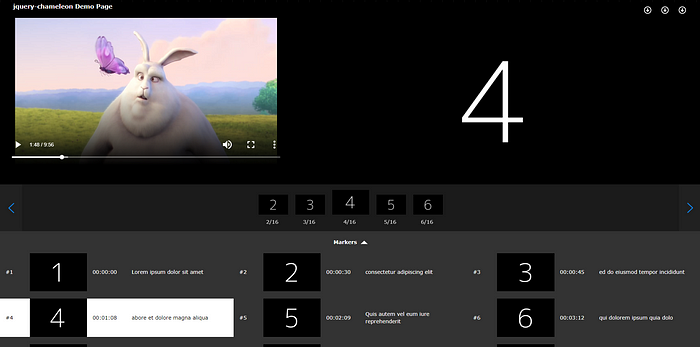
The synchronisation of videos and PowerPoint presentation slides enhance the user experience, especially for e-learning portal or lecture-viewing systems . The general approach is to utilise the time sequence to detect and recognise slide changes.
jQuery-chameleon gives more than that. It is a jQuery plugin which allows users to synchronise video with slide images in several players such as JWPlayer 7, HTML5 or Youtube Player as well as several features.
## Installation
To get started, you need to download the plugin files via NPM
```
npm install jquery-chameleon
```
or via CDN
```
https://gitcdn.xyz/repo/wingkwong/jquery-chameleon/master/src/chameleon.min.js
https://gitcdn.xyz/repo/wingkwong/jquery-chameleon/master/src/chameleon.min.css
```
As the plugin is dependent on jQuery, hence jQuery script must be included before jQuery-chameleon ones
```js
```
## Usage
In your HTML page, create a div like this
```html
```
In your JavaScript file, select the div you just created and trigger chameleon with options like this
```js
$(".chameleon").chameleon(options);
```
jQuery-chameleon supports below options:
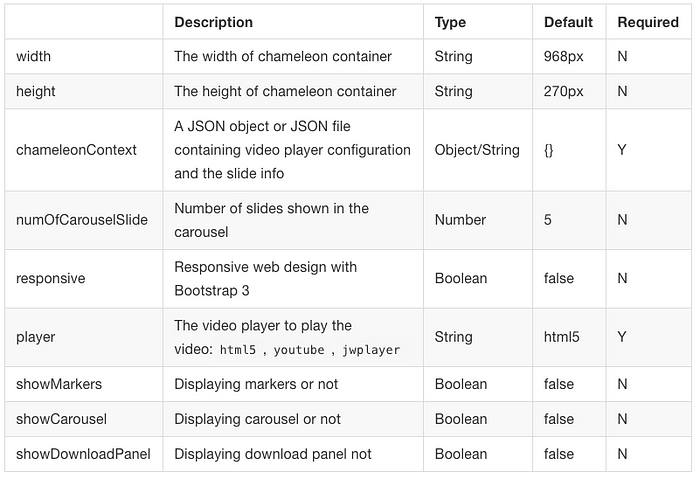
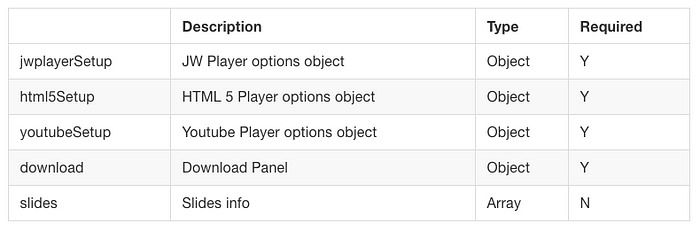
For chameleonContext, you can either pass a JSON file or an object with the below options:
## Player Setup
### Configure Chameleon to use HTML5 Player:
By default, HTML5 Player is used. You can configure it in ‘’player’’ option.
HTML5 setup contains tow attributes — sources and poster:
The sources attribute contains “file” and “type” options, it can be a single object:
```js
$('.chameleon').chameleon({
player: "html5",
chameleonContext: {
"html5Setup" :{
"sources": [
{
"file": "http://commondatastorage.googleapis.com/gtv-videos-bucket/sample/BigBuckBunny.mp4",
"type": "video/mp4"
}
]
}
}
});
```
Or it can be an array of multiple objects. The browser will use the first recognized format.
```js
$('.chameleon').chameleon({
player: "html5",
chameleonContext: {
"html5Setup" :{
"sources": [
{
"file": "http://commondatastorage.googleapis.com/gtv-videos-bucket/sample/BigBuckBunny.mp4",
"type": "video/mp4"
},
{
"file": "http://commondatastorage.googleapis.com/gtv-videos-bucket/sample/BigBuckBunny.mp4",
"type": "video/mp4"
},
{
"file": "http://commondatastorage.googleapis.com/gtv-videos-bucket/sample/BigBuckBunny.mp4",
"type": "video/mp4"
}
]
}
}
});
```
### Configure Chameleon to use Youtube Player:
Only video ID needs to be specified in Youtube setup. The YT Player script will be loaded dynamically in the plugin.

Example:
```js
$('.chameleon').chameleon({
player: "youtube",
chameleonContext: {
"youtubeSetup": {
"videoId": "9xwazD5SyVg"
}
}
});
```
### Configure Chameleon to use JWPlayer 7:
[Please refer to JW Player Configuration Reference](https://developer.jwplayer.com/jw-player/docs/developer-guide/customization/configuration-reference/)
In order to use JWPlayer, the prerequisites are shown as following:
- You need to have a valid JWPlayer 7 script including a license key
- The script should be imported before the chameleon one
Example:
```js
$('.chameleon').chameleon({
player: "jwplayer",
chameleonContext: {
"jwplayerSetup": {
"file": "http://example.com/myVideo.mp4",
"height": 360,
"width": 640,
"autostart": true,
"advertising": {
"client": "vast",
"tag": "http://adserver.com/vastTag.xml"
}
}
}
});
```
### Download
jQuery-chameleon allows users to download slide, video and transcript files. To enable this feature, set showDownloadPanel to true.
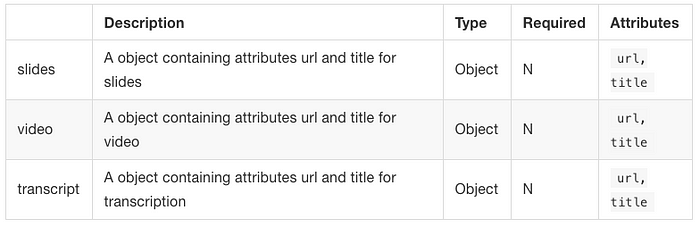
Example:
```js
$('.chameleon').chameleon({
chameleonContext: {
"html5Setup": {
"sources": [{
"file": "http://commondatastorage.googleapis.com/gtv-videos-bucket/sample/BigBuckBunny.mp4",
"type": "video/mp4"
}]
},
"download": {
"slides": {
"url": "https://dummy.gk/wIngKwoNg.zip",
"title": "Download Slides"
},
"video": {
"url": "http://commondatastorage.googleapis.com/gtv-videos-bucket/sample/BigBuckBunny.mp4",
"title": "Download Video"
},
"transcript": {
"url": "https://goo.gl/swiAnf.zip",
"title": "Download Transcript"
}
}
}
});
```
### Slides
The slides object contains slide information. jQuery-chameleon takes the slides object to render the synchronisation.
```js
$('.chameleon').chameleon({
player: "youtube",
chameleonContext: {
"html5Setup": {
"sources": [{
"file": "http://commondatastorage.googleapis.com/gtv-videos-bucket/sample/BigBuckBunny.mp4",
"type": "video/mp4"
}]
},
"slides": [{
"time": "00:00:00",
"img": "https://dummyimage.com/600x400/000/fff&text=1",
},
{
"time": "00:00:02",
"title": "Ultricies nec, pellentesque eu",
"img": "https://dummyimage.com/600x400/000/fff&text=2"
},
{
"time": "00:00:05",
"title": "Augue velit cursus nunc",
"img": "https://dummyimage.com/600x400/000/fff&text=3"
},
{
"time": "00:00:08",
"title": "Donec quam felis,",
"img": "https://dummyimage.com/600x400/000/fff&text=4",
"alt": "Donec quam felis"
}
]
}
});
```
### Carousel
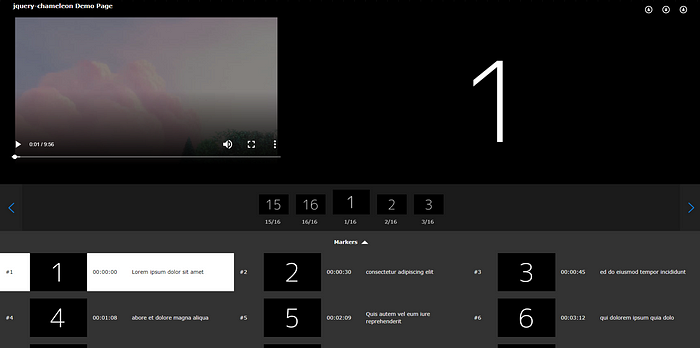
Carousel is a navigation which allows users to select the previous / Next N slides where N can be configured numOfCarouselSlide option. To enable this feature, set showCarousel to true.
### Markers
Markers take “slides” object and show the information on all slides. By default, the block is collapsed and it can be expanded by clicking the arrow button. The current slide being showed is highlighted in White.To enable this feature, set showMarkers to true.
When the slide block is being clicked, the video and the slide would change to the corresponding one.
### Responsive Design
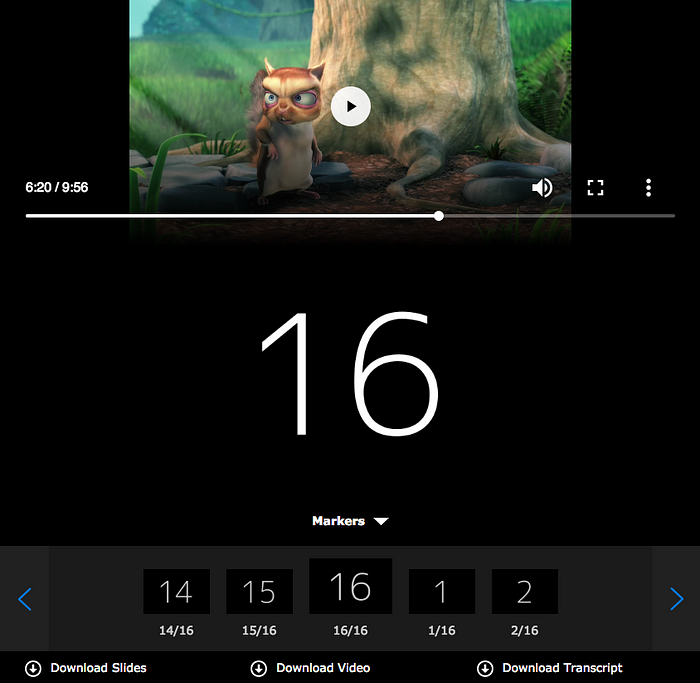
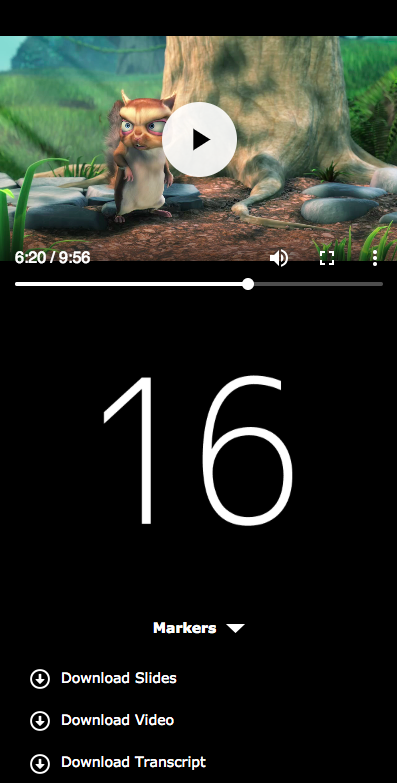
jQuery-chameleon can be rendered in a responsive way using Bootstrap 3. By default, the responsive attribute is set to false. If you enable responsive option, set responsive to true and make sure that you have include Bootstrap 3 library on your website.
Example:
```js
$('.chameleon').chameleon({
responsive: true
});
```
The carousel is not showing in mobile view. However, you are still able to locate to a specific slide in Markers.
Tablet:
Mobile:
## Conclusion
With jQuery-chameleon, we can easily implement a video-slide synchronisation on a HTML page. jQuery-chameleon is an open source plugin. You can find the source code, demonstration and documentation on [Github](https://github.com/wingkwong/jquery-chameleon).
Subscribe to:
Posts (Atom)