Thursday, 21 May 2020
Auto-upgrading nodes in GCP Containers
## Checking the state of auto-upgrade for an existing node pool
```
gcloud container node-pools describe node-pool-name \
--cluster cluster-name \
--zone compute-zone
```
## Enabling node auto-upgrades for an existing node pool
```
gcloud container node-pools update node-pool-name --cluster cluster-name \
--zone compute-zone --enable-autoupgrade
```
## Disabling node auto-upgrades for an existing node pool
where:
```
gcloud container node-pools update node-pool-name --cluster cluster-name \
--zone compute-zone --no-enable-autoupgrade
```
- node-pool-name is the name of the node pool.
- cluster-name is the name of the cluster that contains the node pool.
- compute-zone is the zone for the cluster.

Wednesday, 20 May 2020
Azure Synapse Analytics 101
- formerly Azure SQL Data Warehouse (SQL DW)
- Massively Parallel Processing (MPP) Data Warehouse
- Connection Security - Firewall rules are used by both the server and the database to reject connection attempts from IP addresses that haven't been explicitly whitelisted.
- Authentication - SQL pool currently supports SQL Server Authentication with a username and password, and with Azure Active Directory.
- Authorization - Authorization privileges are determined by role memberships and permissions. Authorization privileges are determined by role memberships and permissions.
- Data Encryption - protects against the threat of malicious activity by encrypting and decrypting your data at rest. Associated backups and transaction log files are encrypted without requiring any changes to your applications when encrypting your database.
- Advanced Data Security - provides a set of advanced SQL security capabilities, including data discovery & classification, vulnerability assessment, and Advanced Threat Protection.
## Transparent Data Encryption (TDE)
- It helps protect against the threat of malicious activity by encrypting and decrypting your data at rest. When you encrypt your database, associated backups and transaction log files are encrypted without requiring any changes to your applications. TDE encrypts the storage of an entire database by using a symmetric key called the database encryption key.
## Granular access controls
- Granular Permissions let you control which operations you can do on individual columns, tables, views, schemas, procedures, and other objects in the database. Use granular permissions to have the most control and grant the minimum permissions necessary.
- Database roles other than db_datareader and db_datawriter can be used to create more powerful application user accounts or less powerful management accounts. The built-in fixed database roles provide an easy way to grant permissions, but can result in granting more permissions than are necessary.
- Stored procedures can be used to limit the actions that can be taken on the database.
## Service Type
- Compute Optimized Gen1
- Compute Optimized Gen2
## Scalability
- Linear Scale on data warehouse unit
## Backup
- Use data warehouse snapshot to create a restore point
Monday, 18 May 2020
Deleting objects in GCP using Lifecycle Policy File
Example: Delete the object after 31 days.
```json
{
"rule":
[
{
"action": {"type": "Delete"},
"condition": {"age": 31}
}
]
}
```
Set the policy
```
gsutil lifecycle set life.json gs://$BUCKET_NAME_1
```
Get the policy
```
gsutil lifecycle get gs://$BUCKET_NAME_1
```
GCP Storage 101
- Use cases:
- website content
- storing data for archiving and disaster recovery
- distributing large data objects to users via direct download
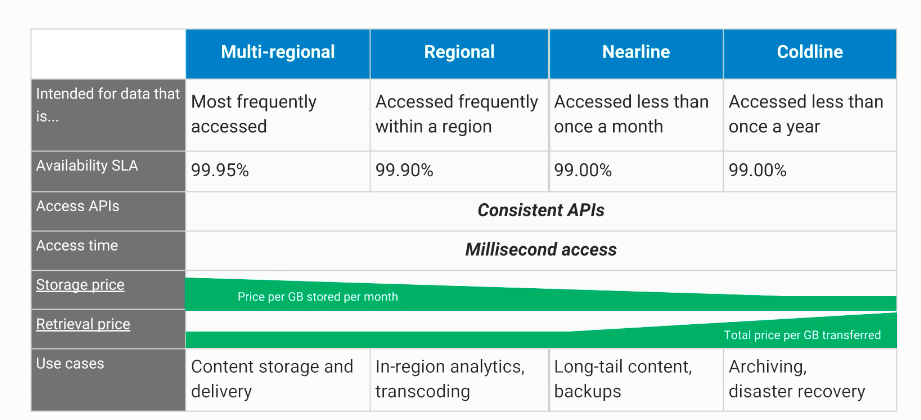
- Scalable to exabytes
- Time to first byte in milliseconds
- Very high availability across all storage classes
- Single API across storage classes
## Signed URLs
- Valet key access to buckets and objects via ticket:
- crytographically signed URL
- time-limited
- operations specfied in ticket: HTTP, GET, PUT, DELETE (not POST)
- any user with URL can invoke permitted operations
- Example:
- ``gsutil signurl -d 10m path/to/privatekey.p12 gs://bucket/object``
## Strong Global Consistency
- read-after-write
- read-after-metadata-update
- read-after-delete
- bucket-listing
- object-listing
- granting access to resources
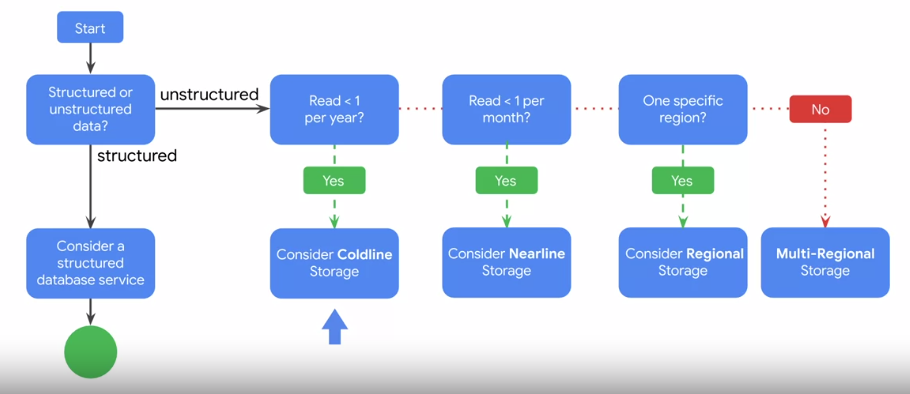
## Choose among Cloud Storage classes
## Cloud Bigtable
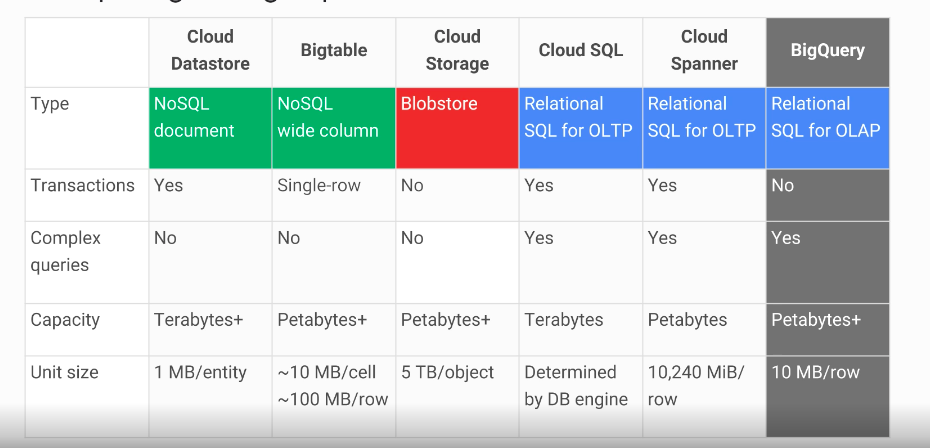
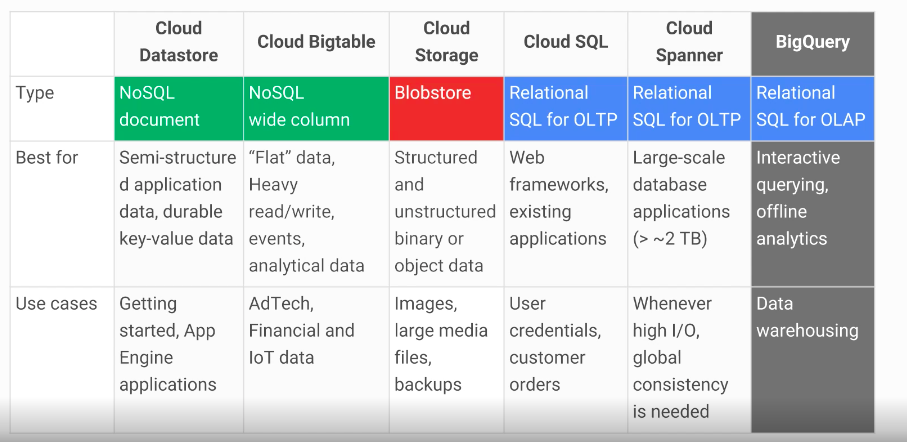
- Fully managed NoSQL, wide-column database service for terabyte applications
- Accessed using HBased API
- Native compatibility with big data Hadoop ecosystems
- Managed, scalable storage
- Data encryption in-flight and at rest
- Control access with IAM
- Bigtable drives major applications such as Google Analytics and Gmail
## Cloud SQL
- managed RDBMS
- offers MYSQL and PostgreSQLBeta databases as a service
- automatic replication
- managed backups
- vertical scaling (read & write)
- horizontal scaling (read)
- google security
- enable binary logging to use point-in-time recovery but it may slightly affect write performance
## Cloud Spanner
- horizontally scalable RDBMS
- strong global consistency
- managed instances with high availablity
- SQL queries
- ANSI 2011 with extensions
- automatic replication
## Cloud Datastore
- designed for application backends
- supports transactions
- includes a free daily quota
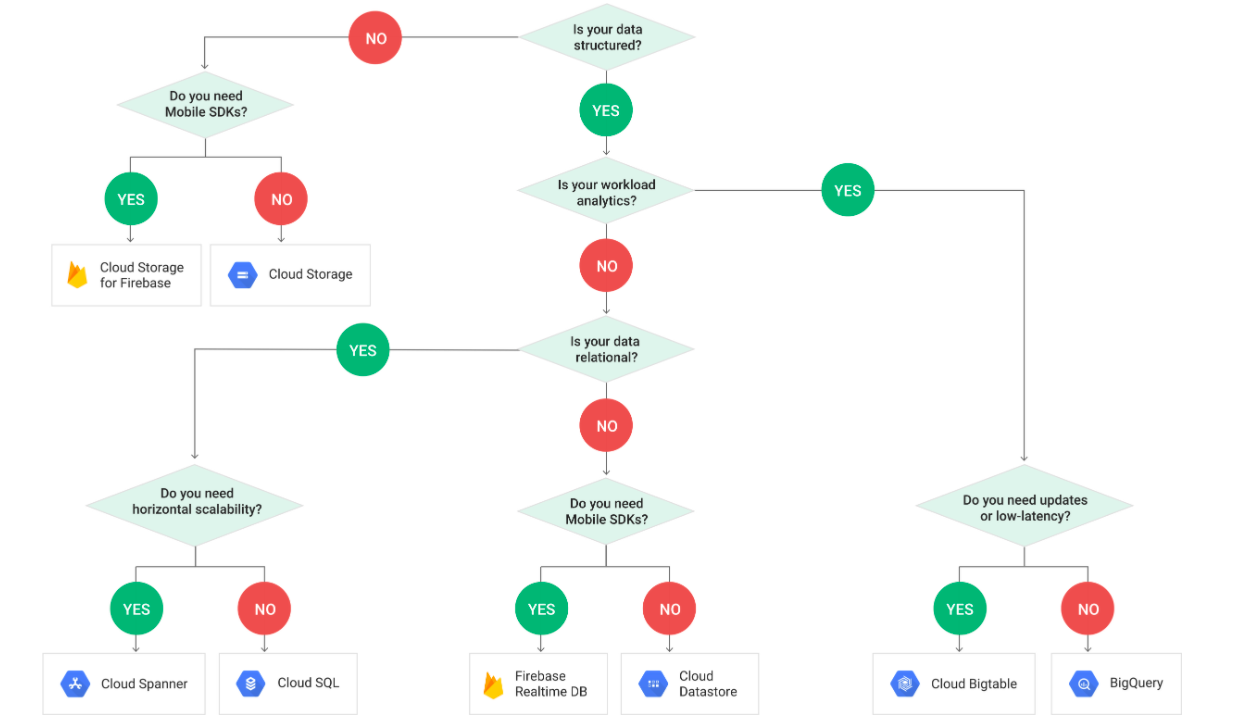
# Comparing Storage Options
# Decision Flowchart
GCP SSH Keys 101
## Generating SSH Keys
```
ssh-keygen -t rsa -f ~/.ssh/[KEY_FILENAME] -C [USERNAME]
```
Restrict access
```
chmod 400 ~/.ssh/[KEY_FILENAME]
```
## Locating an SSH Key
```
Linux and macOS
Public key: $HOME/.ssh/google_compute_engine.pub
Private key: $HOME/.ssh/google_compute_engine
Windows:
Public key: C:\Users\[USERNAME]\.ssh\google_compute_engine.pub
Private key: C:\Users\[USERNAME]\.ssh\google_compute_engine
```
## Adding/Removing Project-Wide Public SSH Keys
```
gcloud compute project-info describe
```
```
...
metadata:
fingerprint: QCofVTHlggs=
items:
- key: ssh-keys
value: |-
[USERNAME_1]:ssh-rsa [EXISTING_KEY_VALUE_1] [USERNAME_1]
[USERNAME_2]:ssh-rsa [EXISTING_KEY_VALUE_2] [USERNAME_2]
...
```
Project Level
```
gcloud compute project-info add-metadata --metadata-from-file ssh-keys=[LIST_PATH]
```
Instance Level
```
gcloud compute instances add-metadata [INSTANCE_NAME] --metadata-from-file ssh-keys=[LIST_PATH]
```
## Blocking Project-Wide Public SSH Keys
```
gcloud compute instances add-metadata [INSTANCE_NAME] --metadata block-project-ssh-keys=TRUE
```
Subscribe to:
Posts (Atom)